AI Personal Assistant Apps Compared for Everyday Use
ChatGPT dominates, but specialists win at specific jobs.

The acceleration matters more than the scale. Global downloads of generative AI apps neared 1.7 billion in the first half of 2025, with in-app purchase revenue reaching nearly $1.9 billion. Downloads climbed 67% half-over-half, the fastest growth rate since early 2023. That's not a maturing market finding its ceiling; that's a category still in full sprint.
ChatGPT's dominance within that growth is striking for a specific reason. It captured 63% of all generative AI app revenue in H1 2025 and logged roughly 470 million global downloads, about 3.7 times the next closest competitor. That kind of concentration doesn't happen from product quality alone. It signals network effects, the kind where a tool becomes the default not because it's necessarily best for any given task, but because it's what everyone already uses and recommends to the next person.
Download share and actual usefulness are separate questions, though, and this piece is about the second one. More people downloading ChatGPT tells you it's the default choice. It tells you very little about whether it's the right choice for your specific calendar problem or your research workflow.
Per the Stanford AI Index, generative AI reached 53% population adoption within three years of broad availability, faster than the personal computer or the internet. Most people reading this are already using something. But what if the more important question isn't whether you're using AI — it's whether you're using the right thing for the right job, or whether you've defaulted to whatever you heard about first and quietly resented it ever since?
One more signal: the market is still fragmenting, not consolidating. Specialists like Perplexity, Motion, and Lindy are gaining real traction alongside the generalists. If one tool handled everything competently, specialists wouldn't be growing. The fragmentation is the market admitting, without saying so directly, that no single app does all of this well.
And then there's Clockwise, which serves as a concrete reminder that this landscape moves faster than most tool comparisons acknowledge. Clockwise, a well-regarded AI calendar tool, was acquired by Salesforce and shut down in March 2026. Any workflow you build around a specific product carries continuity risk. Reorganize your entire schedule around something, and you will likely be reorganizing it again sooner than you planned.
What general-purpose assistants actually do well in daily use — and where their limits show up
ChatGPT, Claude, Gemini, and Microsoft Copilot share a fundamental architecture: they respond when you ask, then wait. None will act on your behalf without being prompted, in that moment, every time. That's a deliberate architectural choice, and it matters enormously when you're comparing them to what comes later in this piece.
ChatGPT
With over 400 million weekly active users as of early 2026, ChatGPT is the de facto default. Its actual competitive advantage isn't superiority at any single task; it's versatility across all of them, which is a different thing and worth keeping distinct in your head.
Voice mode works in real daily practice. File and image understanding holds up. The reasoning models handle harder analytical problems when you need them. Gmail and Calendar connectors exist, but they're reactive rather than proactive. ChatGPT will send the email you ask it to write; it won't watch your inbox and notice patterns. That distinction keeps recurring throughout this piece, because it's where people tend to misplace their frustration.
Best daily jobs: research summarization, drafting, quick Q&A, voice-based thinking when you're walking between meetings and need to process something without sitting down.
Claude
Claude's differentiation is context and patience. It handles large documents, long memos, and complex briefs with a context window that can hold the whole thing in mind. The mobile app is clean and fast; reviewing a dense contract on a commute is a practical use case, not a marketing scenario someone invented.
Fewer consumer integrations than ChatGPT or Gemini, and it operates primarily as a conversational surface. That keeps it in the general-purpose category for most users, which is fine, because what it does within that category is good.
One privacy detail worth naming explicitly: as of late 2025, Anthropic moved to a default opt-in model for training data. Users who didn't explicitly opt out by September 28, 2025 had their conversations included in training data, storable for up to five years. If you're running confidential documents through Claude, check your current settings before assuming the defaults are protecting you.
Best daily jobs: writing drafts that need real polish, summarizing dense documents, thinking through hard decisions where you want a careful interlocutor rather than a fast one.
Google Gemini
Gemini's strongest argument is ecosystem coherence. Deep integration with Gmail, Calendar, Drive, and Maps means that if your work life already runs on Google Workspace, Gemini requires almost no behavioral adjustment. The context window handles unwieldy documents without complaint.
The trade-off is account and privacy complexity that doesn't surface in feature comparisons. Consumer versus Workspace plan settings, activity data, and connected apps all behave differently depending on your situation, and understanding which applies to you takes deliberate attention. A real hidden cost, but not a dealbreaker.
Best daily jobs: managing Google Calendar from voice, summarizing long Drive documents, cross-referencing sprawling Gmail threads without losing the thread yourself.
Microsoft Copilot
Copilot's value proposition is almost embarrassingly simple: it lives inside Word, Excel, PowerPoint, Outlook, and Teams. No context-switching, no copying output into another app. If your day already runs inside Microsoft 365, the integration argument is genuine rather than theoretical.
A UK government trial found workers saved an average of 26 minutes per day with Copilot, roughly two weeks per year. That's meaningful, though the conditions of any single trial are worth understanding before treating the number as universal. At $30 per user per month on top of an existing M365 subscription, the math only works if the Microsoft stack is already central to your work. As of 2026, Copilot integrates Anthropic's Claude as part of a multi-model strategy, which represents a notable architectural shift for what had been a more closed ecosystem.
Best daily jobs: in-meeting note capture into action items, building decks from meeting transcripts, drafting Outlook emails with full thread context already loaded.
The ceiling all four share
None of these tools will run anything on a schedule, monitor an inbox for changes, or chain tasks across apps without being prompted each time. You'll feel this ceiling most acutely on the days when you find yourself re-prompting the same request for the third time that week. That raises an important question: why doesn't it just know by now? That experience is a category signal, not a product complaint.
What research and voice-forward tasks look like when you have the right tool
Research
The meaningful distinction here isn't quality of reasoning. It's source behavior. Tools that synthesize from training data and tools that retrieve from live sources with citations are doing structurally different things, even when the outputs look nearly identical on screen.
Perplexity is purpose-built for cited, real-time research. Every answer is grounded in live web sources, which matters when currency and verifiability are the actual point. If you're checking a market statistic before a client call, or fact-checking a claim before forwarding it, the difference between "synthesized from training data" and "retrieved from this specific source, published three days ago" is not minor.
ChatGPT and Claude with web search enabled can retrieve live information, but they default to synthesis mode. The sourcing is less rigorous by design, which is a reasonable trade-off when currency is secondary to depth of reasoning, and a bad one when the accuracy of a specific fact is what you actually need.
Practical daily jobs Perplexity handles better than the generalists: market research, academic background reading, verifying a specific claim before repeating it in a room full of people who might know better.
Voice
Voice is the most underrated dimension of this comparison, mostly because people assume that if something responds to speech, it's equivalent to everything else that responds to speech. It isn't.
ChatGPT's Advanced Voice Mode delivers GPT-class reasoning through a voice interface in real time. That's useful for thinking out loud, drafting while driving, or working through a problem when your hands aren't free and your laptop is closed.
Siri is optimized for ecosystem actions on Apple hardware: calls, alarms, messages, directions. It's strong for "do this" commands and weak for "help me think through this." Those are different use cases, and conflating them produces unfair comparisons in both directions. Siri wasn't built to help you reason; it was built to help you act quickly within Apple's ecosystem, and it does that well. Amazon Alexa's voice strengths are home control and Amazon commerce. Evaluating it as a reasoning tool misses what it was actually built for.
The practical lesson: voice capability is not equivalent across tools even when all of them technically respond to speech. Siri and Alexa are specialists. Comparing either of them to ChatGPT on a research task isn't a fair test of any of them.
How AI calendar tools differ in the degree of control they hand to the algorithm
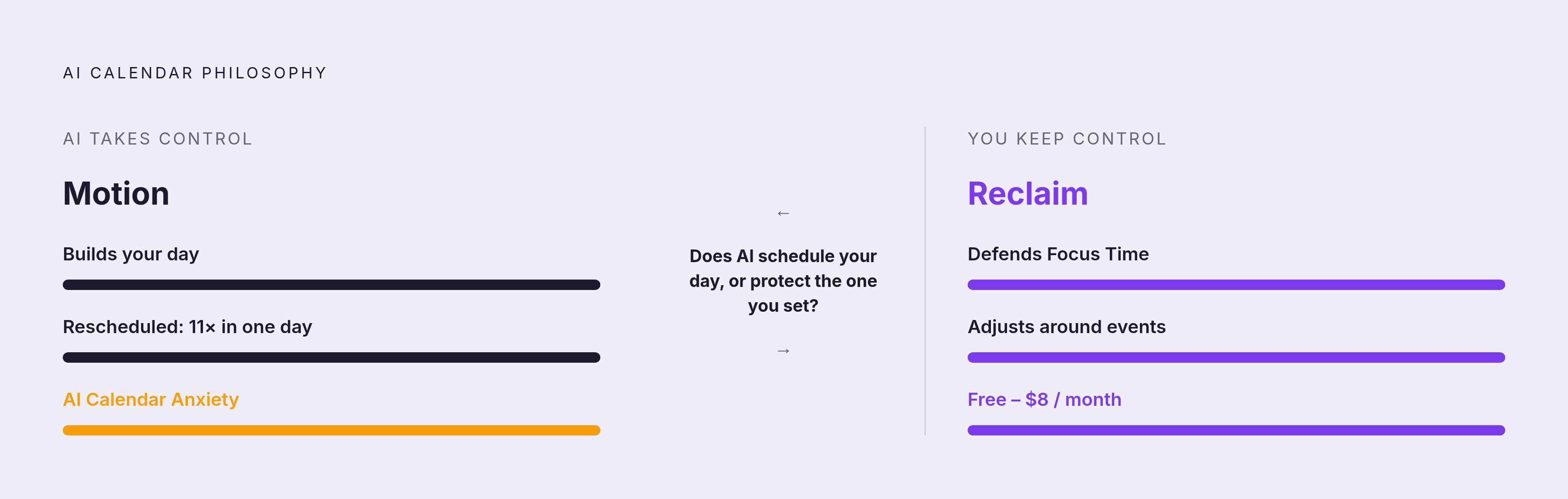
The core distinction between Motion and Reclaim isn't features. It's a philosophical disagreement about who should control the structure of your day, and the answer has real consequences for how you experience your work on a Tuesday afternoon when everything has shifted.
Motion gives control to the AI. It builds your entire day, slots tasks between meetings, and rearranges the schedule when things shift. You provide tasks and deadlines; the algorithm decides when you do them. For someone with a chaotic, deadline-driven task load who wants to stop negotiating with their own calendar, that's powerful.
The trade-off shows up in practice in ways that aren't entirely comfortable. During testing documented across productivity communities, one user's task list was rescheduled eleven times in a single day. There's a term circulating for the experience: "AI Calendar Anxiety." The app is making correct decisions by its own logic, but the constant rescheduling can feel destabilizing rather than freeing, which matters if you're someone who needs a stable plan to feel productive rather than just theoretically optimized. Motion has since broadened into what it's calling an "AI Super App," adding Docs, project management, and AI Employees features after raising $60 million at a $550 million valuation in September 2025.
Reclaim takes the opposite approach. You decide what to work on and when; Reclaim defends that time and adjusts around external events. It protects Focus Time and Habits rather than overriding them. You make more decisions yourself, but the day stays recognizable as yours. It launched full Microsoft 365 and Outlook integration in August 2025, which made it viable outside Google Workspace at real scale for the first time. At a price point between free and eight dollars per month on an annual plan, it's one of the higher-value tools in the category.
But what if the question isn't which tool has better features — but which version of control actually matches how you work? Do you want AI to schedule your day, or do you want AI to protect the schedule you've already set? Both are legitimate preferences. They lead to different tools, and choosing wrong produces real frustration that's hard to diagnose because both tools are doing exactly what they promised.
Clockwise is no longer a live option. Acquired by Salesforce, shut down March 27, 2026. If it appears in any comparison list you're currently reading, that list is out of date.
Where agentic tools like Lindy take over tasks that conversational tools only talk about
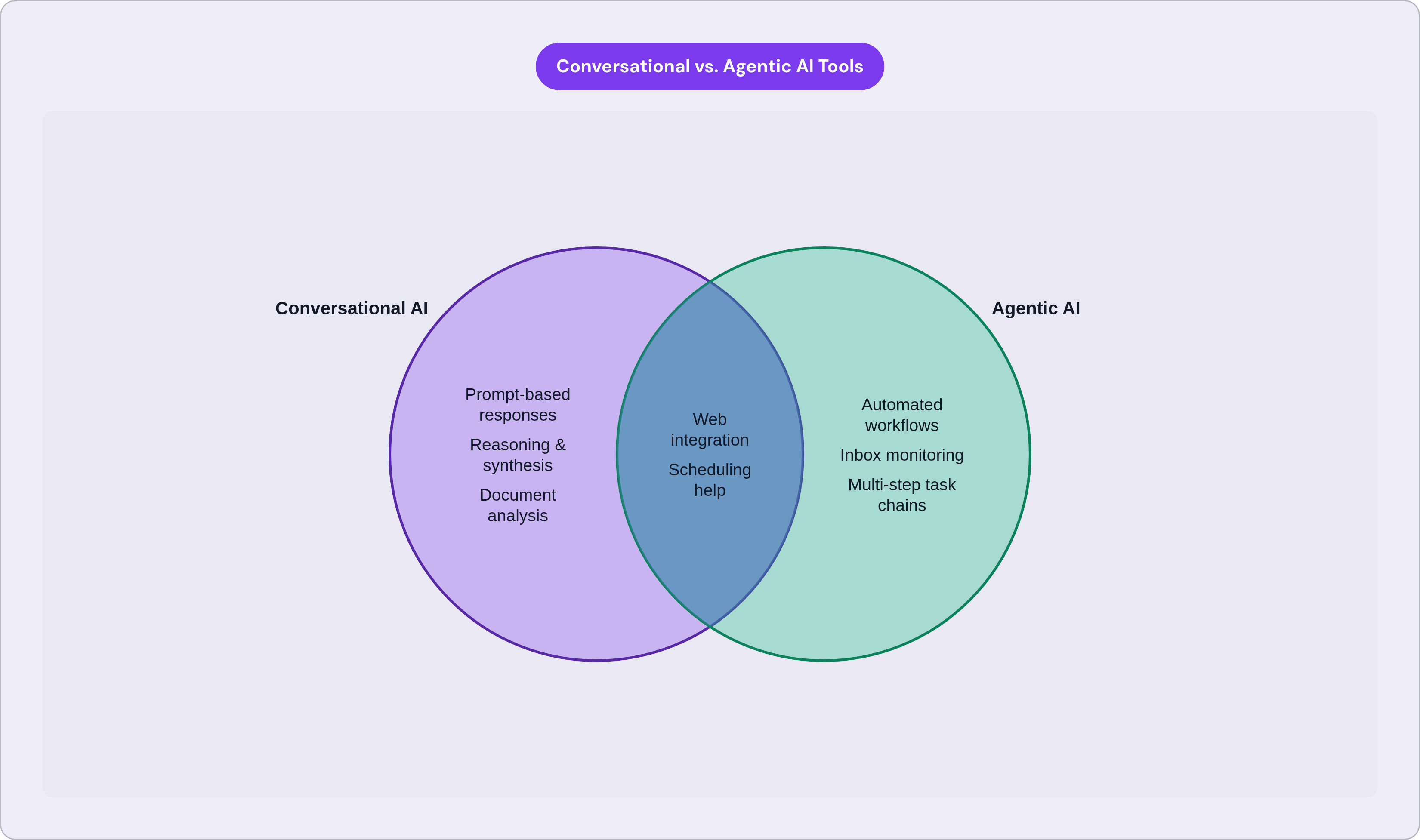
Here's the concrete difference: Lindy can monitor an inbox and route or respond to emails based on rules you define once. It can detect a scheduling request, check the calendar, propose a time, log it in the CRM, and create a follow-up task, without you re-prompting it each time the scenario recurs. It operates across inboxes, calendars, and work tools in the way a human assistant actually would, not one app at a time, not one prompt at a time.
That list of capabilities isn't a faster version of what ChatGPT and Claude do. It's a structurally different kind of software behavior. The distinction matters because a lot of people buy a conversational tool, discover it can't do this, and conclude that AI isn't ready yet, when what actually happened is they bought the wrong category.
Who Lindy is actually built for: founders, executives, sales and recruiting teams, anyone with heavy inbox and meeting volume who spends meaningful hours on administrative tasks that follow recognizable patterns. It isn't a general-purpose replacement for ChatGPT. The reader who uses ChatGPT to think through a hard essay and occasionally drafts an email doesn't need it. The founder whose team handles fifty scheduling emails a week probably does.
At $49.99 per month, Lindy is priced like a productivity tool, not a consumer app. The ROI question is direct: does the time saved on administrative tasks justify that cost, relative to what a general-purpose tool costs? That's a calculation anyone can do with their own inbox data.
The broader category is moving fast. Claude's most recent major model introduced agent teams that can orchestrate multiple AI agents on complex tasks. ChatGPT's connectors are moving in the same direction. The line between conversational and agentic tools is actively blurring. But full, reliable agentic behavior, the kind where you define the workflow once and the tool executes it without supervision, remains the domain of purpose-built tools for now.
The clearest signal that you belong in this category: you're typing the same kind of request to a chatbot on a recurring basis. That's a workflow an agent can own.
What the time-savings evidence actually shows — and what it tends to miss
The headline numbers are real. Federal Reserve Bank of St. Louis research from 2025 finds generative AI users save 5.4% of their work hours, roughly 2.2 hours per forty-hour week. Research from NBER and Microsoft found 3.6 hours saved per week specifically on email management, a 31% reduction in email time for knowledge workers using generative AI tools. A controlled GitHub experiment found developers using Copilot completed tasks 55.8% faster.
Those are meaningful numbers. But time saved in one place doesn't automatically stay saved.
It is also worth considering a paradox that rarely surfaces in efficiency studies: a worker saves thirty minutes drafting an email with AI and immediately loses that time to three more meetings that got scheduled because everyone assumes the team has more bandwidth now. The savings evaporate into expanded expectations. Microsoft's own Work Trend Index captures this tension directly. Ninety percent of AI users say the tools help them save time; in the same survey, 48% of employees and 52% of leaders describe their work as feeling chaotic and fragmented. Both things are simultaneously true, and sitting with that dissonance for a moment tells you something real about how efficiency gains actually distribute in practice.
This isn't an argument against using these tools. It's an argument for being deliberate about which tasks you apply them to. The savings are most durable when AI removes a task you dislike and you don't immediately fill the gap with more of the same kind of work. That's precisely why matching the tool to the specific job matters more than choosing the highest-rated app overall. A great tool applied to the wrong job still produces disappointment, and it produces a particular kind: the kind where you can't quite articulate what went wrong because the tool worked exactly as described.
A practical matching guide: which tool fits which daily job
Organized by what you need, not by what each product wants to be.
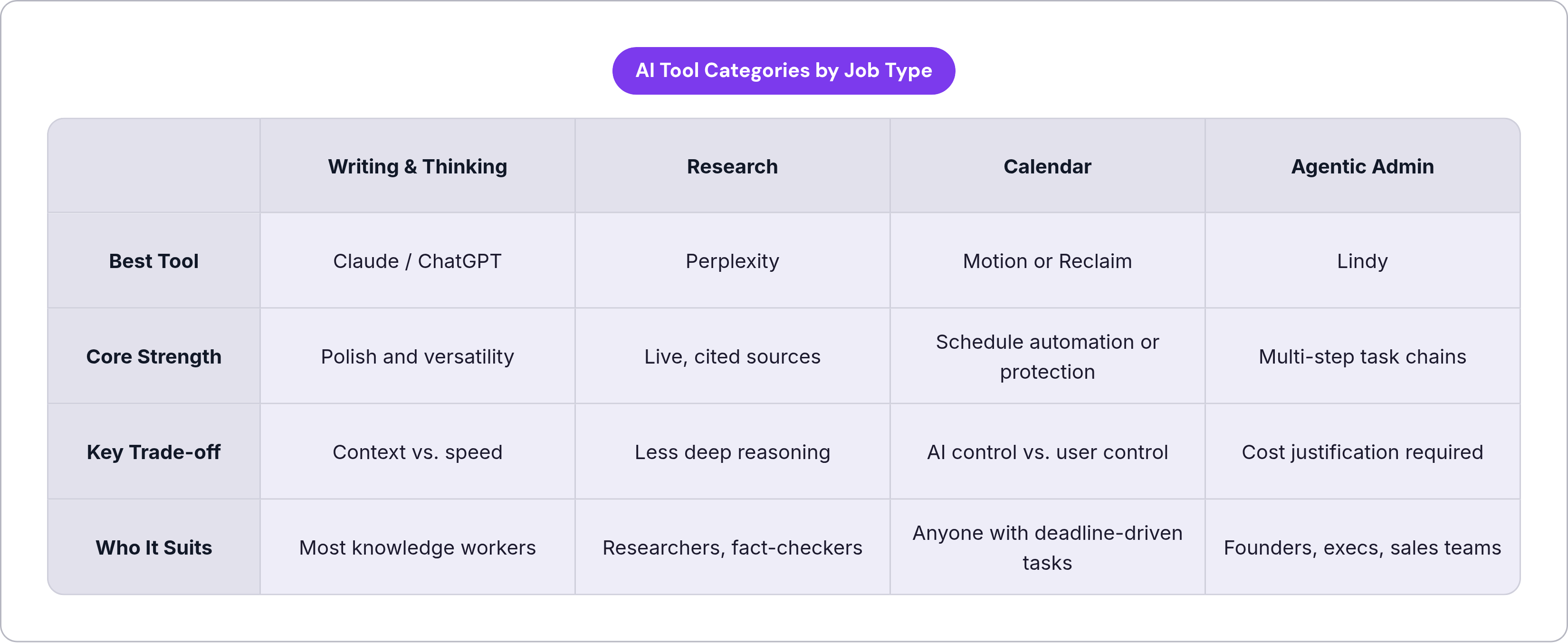
Writing and thinking through hard problems: Claude for documents requiring polish, nuance, and careful reasoning over long form; ChatGPT for speed and versatility across shorter tasks. Both are strong; the difference is context window size and how considered versus quick the output tends to feel.
Research with sources you can actually verify: Perplexity for live, cited answers where currency and verifiability matter. ChatGPT or Claude with web search enabled for synthesis where having the most recent data is secondary to depth of reasoning.
Calendar and scheduling: Motion if you want the AI to own the structure of your day and make the sequencing decisions. Reclaim if you want to own the day yourself and have AI protect what you've planned. Both are now available to Microsoft 365 users following Reclaim's August 2025 Outlook integration. Clockwise is no longer an option.
Microsoft 365 in-app productivity: Copilot integrates where the work already happens and requires no behavioral change in tool switching.
Google Workspace productivity: Gemini, with deliberate attention to your account type and which privacy settings currently apply to it.
Home and phone-native voice commands: Siri for Apple devices; Alexa for smart home and Amazon commerce. Neither is a reasoning tool, and expecting either to behave like one produces frustration that isn't the product's fault.
Inbox and cross-app admin workflows: Lindy for agentic, multi-step task chains that would otherwise require daily re-prompting. Seriously evaluate this category when you notice yourself typing the same kind of request to a chatbot on a recurring basis.
No single app handles all of these jobs well. Go in expecting one tool to do everything, and you'll be disappointed by all of them. The disappointment won't be a product failure; it'll be a mismatch between what you expected and what the architecture was built to do. Figure out which category you actually need, then choose within it.