AI Task Managers vs Traditional To-Do Apps
AI task managers automate scheduling and prioritization; traditional apps just hold what you type.
Traditional to-do apps and AI task managers get lumped into one category with different price tags attached, but the comparison misses the point. One stores what you type into it. The other reasons about what you actually need to get done, whether you told it or not. That difference in logic, not the feature list, is what should decide which one you use.
What AI task managers actually do under the hood
Old-school apps wait for you, while AI task managers go looking on their own.
Task capture stops being a manual chore. Instead of typing "follow up with vendor" into a box, the system reads your email, scans meeting transcripts, pulls through documents, and pulls out action items without being asked. The better ones go further and infer steps you haven't logged yet, based on what a project or a conversation implies needs to happen next.
Scheduling is where things really split. An AI task manager doesn't just hold a list; it places tasks directly onto your calendar as time blocks, then moves them around when a meeting runs long or something more urgent lands in your inbox. Twenty tasks stop being an abstract list and start looking like an honest picture of what actually fits into today.
Priority sorting shifts too. Instead of a label you assigned last week and forgot to update, the system ranks by deadline, urgency, and what depends on what. It adjusts over time based on how you actually work, not a fixed set of rules someone wrote once and never touched again.
None of this means the software does your job for you, and nobody's inbox gets answered while they sleep. What's happening is that the tool carries weight you used to carry in your own head, the constant recalculating of what matters right now. That's cognitive load moving off your plate, though the decisions still land with you.
Where the two approaches diverge capability by capability
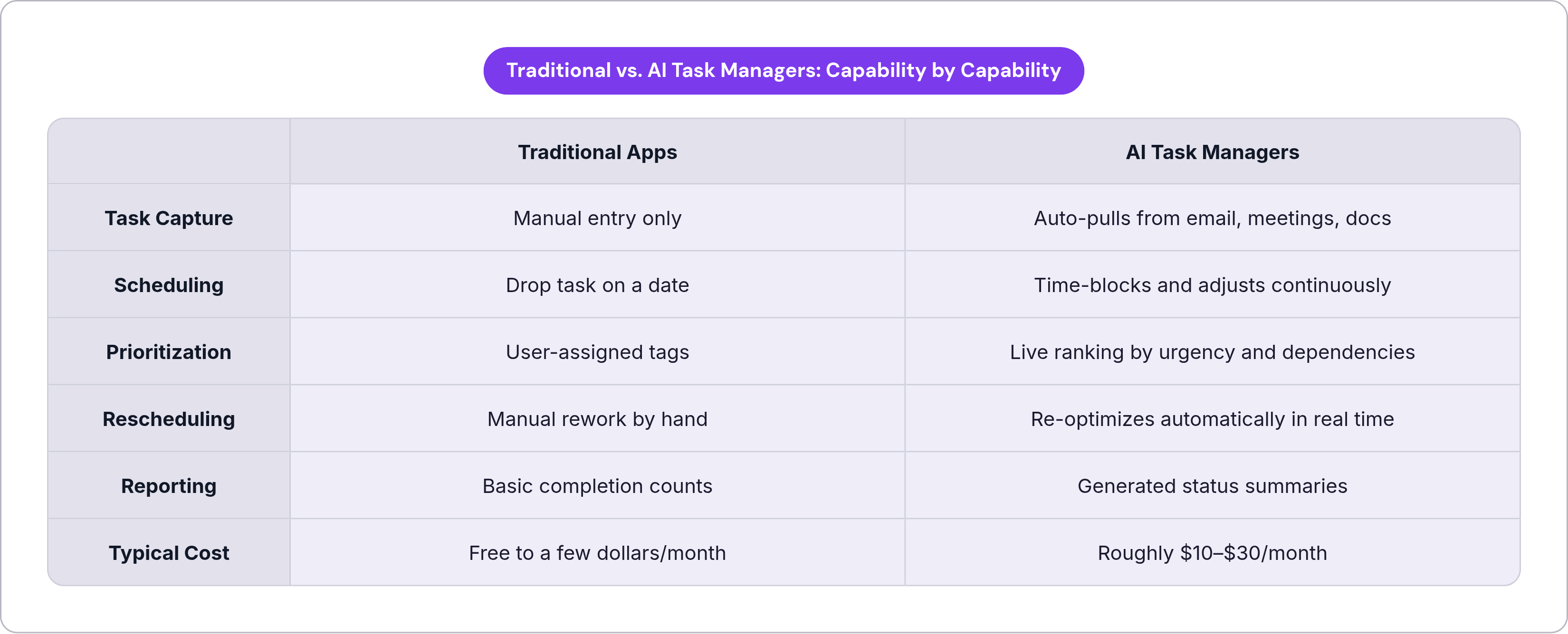
Line them up side by side and the gap is obvious in some spots, almost invisible in others.
Task capture: manual entry, full stop, versus a system pulling from email, meetings, and documents without you touching a keyboard. Scheduling: a traditional app lets you drop a task on a date; an AI-native one time-blocks it and keeps adjusting as your day actually unfolds. Prioritization follows the same split, user tags against a live ranking built on urgency and dependency chains.
Rescheduling is maybe the starkest gap of all. Plans change, they always do, and traditional apps just sit there while you do the rework by hand. AI tools re-optimize on their own, in real time, without a nudge. Reporting tells a similar story: basic completion counts on one side, generated status summaries that read like a project update someone actually wrote for you on the other.
Cost tracks the capability gap pretty closely. Traditional tools run free up through a few dollars a month, while AI-native platforms land somewhere between roughly ten and thirty dollars a month, depending on how deep the reasoning goes.
But the gap isn't uniform, and that's worth sitting with for a second. For a simple, stable checklist, an AI layer is often dead weight. If your task list never collides with your calendar, and nothing about your day is unpredictable, you're paying for horsepower you'll never burn.
The major AI task managers and what each one is actually optimizing for
Every tool in this space picked a different problem to solve first, and it's worth knowing which one before you hand over a subscription.
Motion bet everything on the calendar. Tasks, meetings, and projects all get time-blocked and reshuffled continuously as your day changes, synced across Google Calendar, Outlook, and iCloud. By August 2025, Motion reportedly hit about $50 million in annual recurring revenue, according to Sacra, which tells you people will pay real money for scheduling that actually adapts. Individual plans run around twenty dollars a month; the AI Employees tier runs around thirty dollars per seat. This fits best if your day is wall-to-wall meetings and your task list keeps losing the fight against your calendar.
Reclaim.ai takes a lighter touch. It sits on top of the calendar you already use instead of asking you to learn a new one. Flexible time blocks shift automatically when something new lands. Dropbox bought Reclaim in August 2024 and folded it into a platform with a big existing subscriber base. There's a free Lite tier, with paid plans starting at around ten dollars per seat. Good fit if you want AI scheduling without tearing up your current setup.
ClickUp Brain layers AI onto a full project management platform. It builds task lists from plain-language descriptions and summarizes long threads or meeting notes. It's available as an add-on per user on top of a ClickUp plan. Makes sense for teams already living inside ClickUp who want AI task generation without a migration headache.
Asana AI brings smart priorities and workflow suggestions into a tool a lot of enterprise teams already run on. It's bundled into a higher-tier plan, with no separate add-on charge on top. It reads more as AI-assisted than AI-native, and that distinction matters more than the marketing lets on. Solid pick for organizations already committed to Asana who want incremental gains, not a rebuild.
Notion AI turns messy input (meeting notes, brainstorms, half-formed research docs) into organized task boards. It pulls deadlines and owners out on its own and builds to-do lists straight from documents. The total cost with AI adds up across tiers. Fits knowledge workers whose real task list lives buried in a doc somewhere, not inside a structured project system.
Vellum takes a different angle entirely. It's positioned as a reasoning layer, something that understands context and learns how a person works over time. That's the better match for engineers and product teams doing cognitively dense work that doesn't reduce cleanly into a checklist. The premise here is augmenting judgment, with the human staying in the decision seat.
Real limitations that AI task managers don't advertise
None of this comes free of friction.
There's a real learning curve. Finding and actually using the AI features inside a tool like ClickUp takes deliberate digging around; reviews note the ramp-up can take a meaningful stretch of time before someone feels comfortable. That's not nothing when you're already slammed.
Cost is a real step up too, since free or near-free traditional apps versus $10 to $29 a month adds up fast for an individual or a small team counting every line item on the budget.
Then there's the quieter risk. When the AI handles scheduling and ranking, some people stop practicing that judgment call themselves, and what happens to that muscle after a year of not using it is worth asking, even though nobody has a clean answer yet.
Context blindness is a real problem too. A system reading your inbox can pull the wrong task out, or miss a priority a human would catch on instinct because they know the backstory, not just the words on the page. Auto-reading email, calendar, and documents also means handing over a lot of data access, and that matters far more in a regulated industry than it does for a solo freelancer working out of a coffee shop.
One number worth flagging, with a caveat attached: Trevor AI reports its users complete 85% of tasks. That's Trevor AI's own marketing claim, not independent research, so take it as a directional signal, not something to build a decision on.
Worth separating too: AI features bolted onto a traditional app work differently than an AI-native tool. Microsoft Copilot pulling tasks into To Do is genuinely useful, sure, but the app underneath still won't auto-schedule anything for you. AI-assisted and AI-native are different categories, even when the marketing copy blurs the line on purpose.
Which type of tool fits which kind of work
Start with what your task list actually looks like on an average Tuesday.
Traditional apps make sense when the list is short, stable, and self-generated, when you already know what needs doing and don't need help remembering it. They're also the right call when the work happens mostly offline, away from the email and documents an AI would otherwise scan. If you want full, explicit control over every item and its timing, and the budget is genuinely tight, a free list app doing exactly what it's built to do is nothing to be embarrassed about.
AI task managers start earning their monthly fee once tasks come from too many directions to log by hand: email, meetings, and documents all firing at once, faster than you could ever type them in. They also pay off when your calendar is a battlefield, when meetings routinely eat the hours you meant to spend on real work. Add genuine decision fatigue about what to tackle next, or a team that needs status updates without someone manually compiling them every Friday, and the case gets stronger fast.
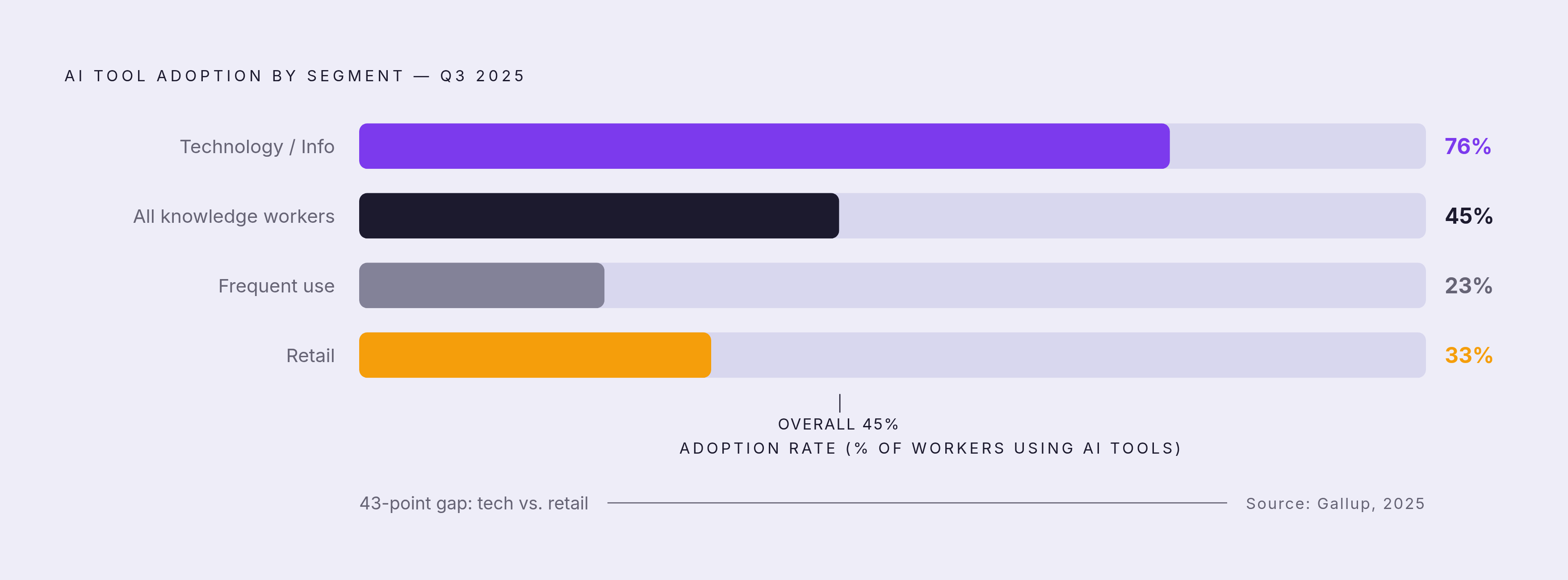
Adoption numbers add some texture here, though they don't settle much on their own. AI tool use among U.S. knowledge workers climbed to 45% by the third quarter of 2025, according to Gallup, with frequent use sitting around 23%. That's a large, growing minority, not a majority, and nowhere close to universal, and the split isn't even across industries: adoption runs at 76% in technology and information sectors versus 33% in retail. The shape of the work drives that gap more than personal taste does.
So which one wins? That framing misses the point. They run on different logic entirely, and the real question is whether your work throws off the kind of complexity that reasoning software actually helps untangle. For work that's cognitively dense and layered with context, where judgment is the actual bottleneck rather than scheduling, a tool built to spot patterns and cut down on context-switching is solving a problem a calendar optimizer was never built to touch. Match the tool to the shape of your problem, and the choice tends to make itself.