AI Knowledge Management Tools for Personal Use
AI-powered search and synthesis beat keywords and memory for personal thinking.
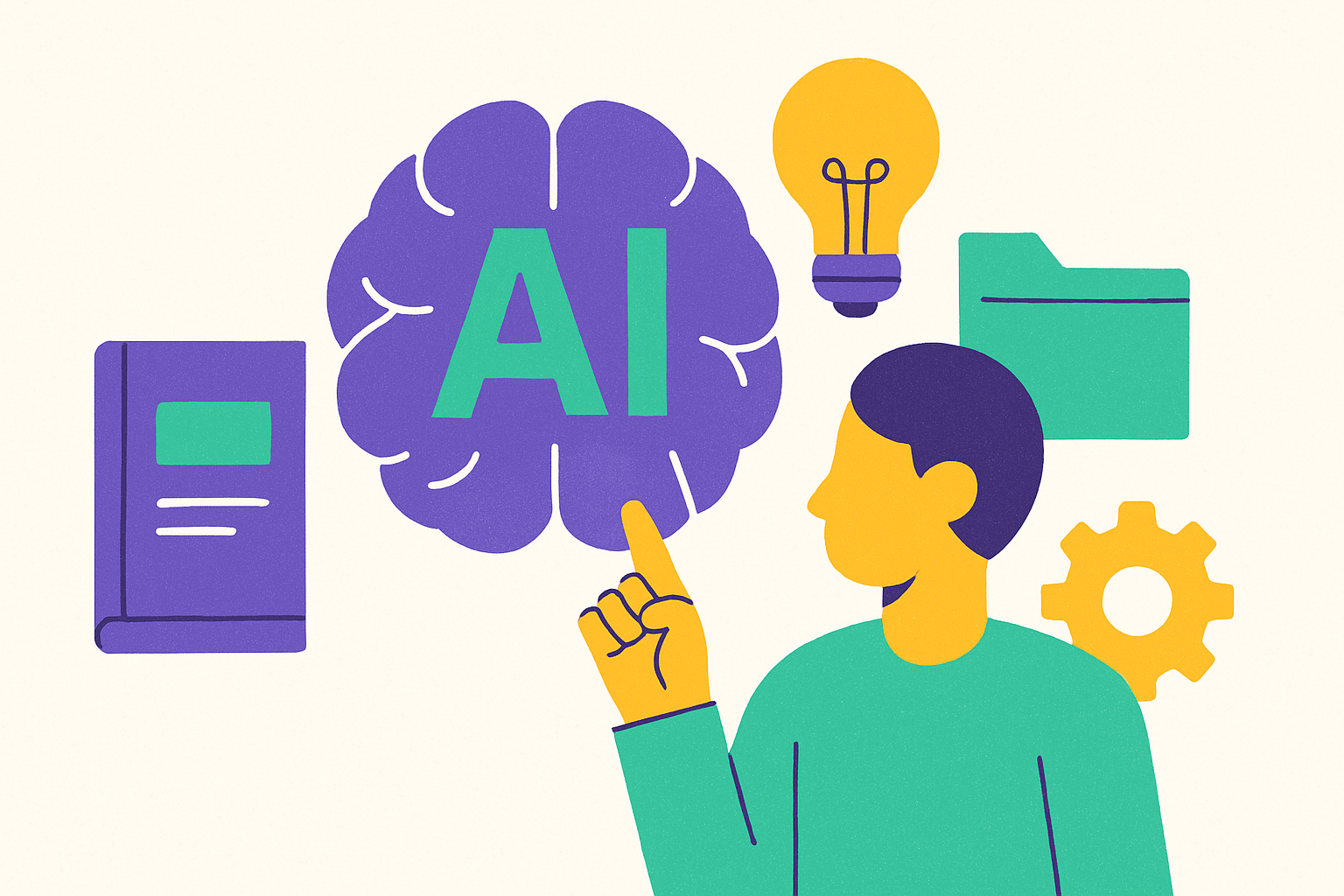
I've spent the last few years bouncing between knowledge tools, mostly because I kept losing track of my own thinking. AI knowledge management tools solve a different problem than note apps ever did. Built right, they act as reasoning partners that surface what you'd otherwise lose, and that changes what "managing information" actually means. The real question is whether the system can think alongside you.
What distinguishes an AI knowledge management tool from a smarter note-taking app
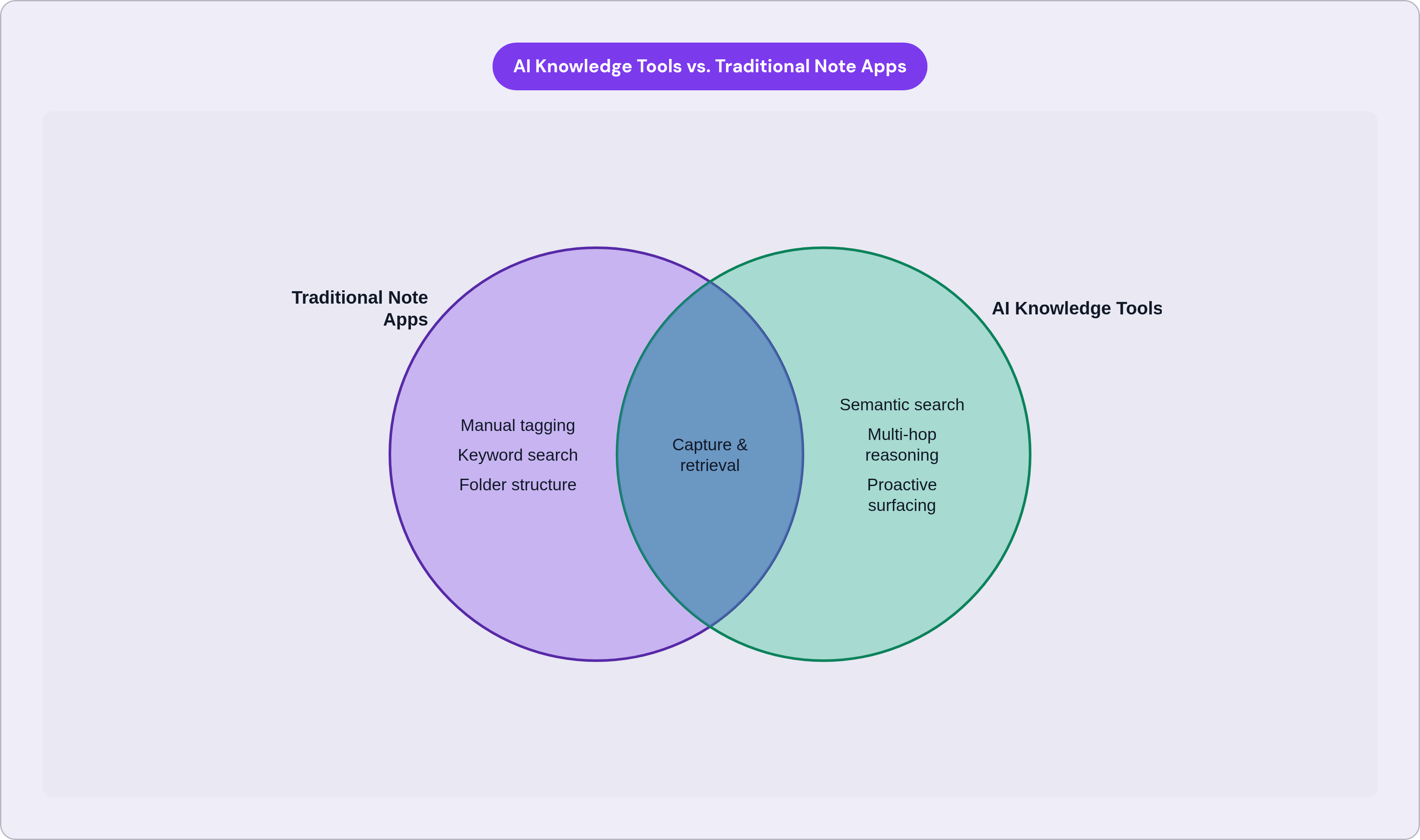
Old-school personal knowledge management works like this: capture something, tag it, search by keyword later. Retrieval is still your job. You have to remember you wrote about a topic, remember roughly what you called it, and hope your past self tagged it the way present-day you is searching. Most of the time your past self didn't, because your past self was busy and didn't know what future you would need.
AI-native tools flip that, since the system reads meaning instead of matching text on a page. Semantic search finds what you meant even when your words don't match the original; ask about "that pricing conversation from spring" and the word "pricing" doesn't need to show up anywhere in the note. Automatic concept linking surfaces connections you never consciously drew between two ideas.
Knowledge graphs go further still, mapping relationships between ideas, people, and projects across your whole archive. That lets the system chain facts across notes the way your brain does when you're mulling something over in the shower, half paying attention, and a connection just arrives. That's multi-hop reasoning, and it's the part that actually feels new to me after years of flat search bars.
Then there's synthesis, where a good system reads your documents and hands you a direct, cited answer instead of ten links to sort through yourself.
Underneath all of it sits a specific stack. Transformer-based language models handle the semantic understanding, and retrieval-augmented generation (RAG) grounds the answers in your own content instead of whatever the model absorbed during training. That distinction matters more for personal use than almost anywhere else, because RAG means the AI reasons over your notes specifically. What comes back is personal and traceable; you can follow it to the exact paragraph it came from.
Augmentation over automation is the line I keep coming back to: the tool surfaces information, but you still decide what to do with it.
How fast this category is growing and what that signals about demand
Seventy-five percent of knowledge workers globally now use generative AI at work, and 46% of them only started in the past six months, a curve bending upward while you're reading this sentence.
Half of Americans now use large language models like ChatGPT, Gemini, or Claude, putting this among the fastest technology adoptions on record. Among people already using these tools, 54% report better productivity and 50% say AI helped them learn new skills faster. Both numbers point the same direction: thinking better, not typing faster.
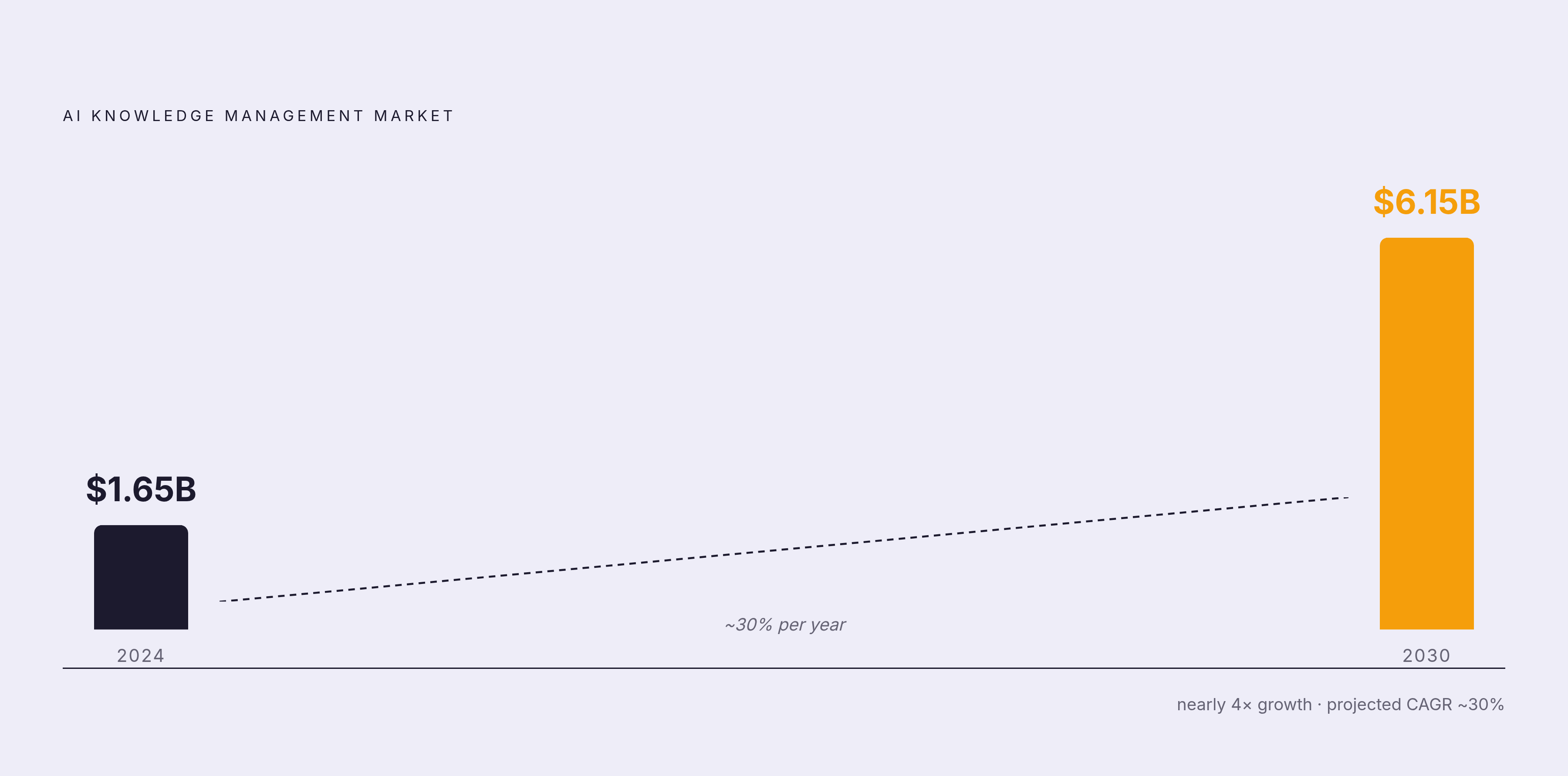
The market numbers back it up structurally. Personal knowledge management software hit $1.65 billion in 2024, and the AI-specific slice is projected to reach $6.15 billion by 2030, growing around 30% a year. A growth rate like that means the category gets rebuilt from the ground up, with AI-native products pushing out the note apps that came before them.
Why now, though? Because the underlying problem keeps getting worse: information scattered across documents, chat threads, and half a dozen apps you forgot you installed. Remote and hybrid work multiplied the number of channels one person has to track. This market is responding to a pressure most of us feel every single week, whether we've named it or not.
What each major tool actually does and who it suits
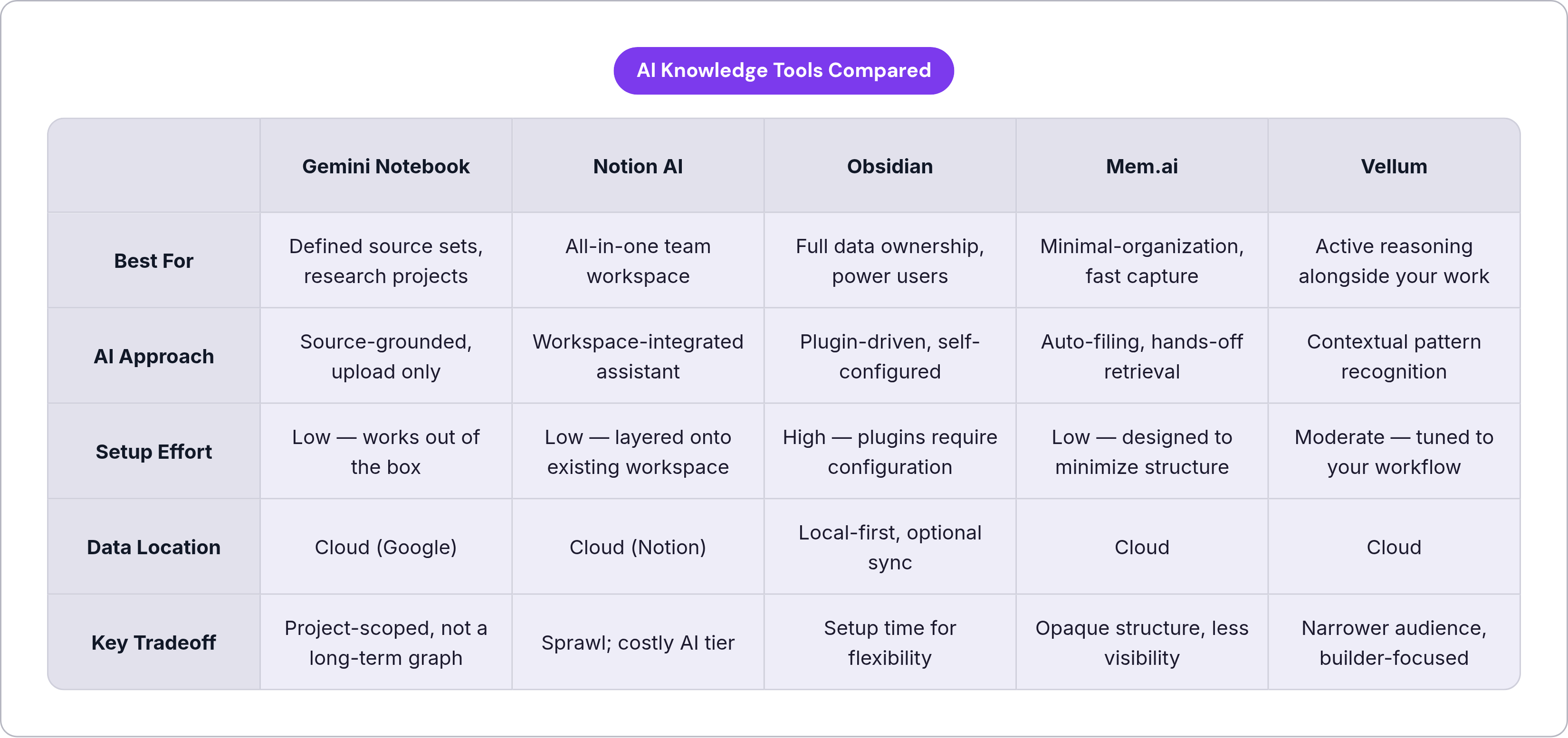
Here's where these tools actually split apart: their assumption about your role. Some assume you'll organize everything yourself, others assume you won't and build around that instead, and a few assume you'd rather build your own system out of parts and wires.
Gemini Notebook, formerly NotebookLM, runs on source-grounded reasoning. The AI only works with what you upload, so there's no risk of it pulling in outside "knowledge" that isn't yours. It grew to 30 million users and over 600,000 organizations before Google folded it into the Gemini rebrand in July 2026; monthly active users grew 120% quarter over quarter in Q4 2024 alone. The user base skews academic (43% students, 26% educators, 18% researchers). The Audio Overviews feature, which turns your sources into an AI-generated podcast, drove the viral curve, with usage roughly doubling every 45 days through the end of 2024. Since the rebrand it also runs native code execution for data work. It's bundled into Google One AI Premium, so if you already pay for that, it's effectively free. Best fit: research-heavy work against a defined set of sources, project by project, rather than a personal knowledge graph you keep building for years.
Notion AI sits on top of Notion's already mature workspace, and the scale here is hard to ignore. Notion has 100 million users worldwide as of 2024, over 4 million paying customers, and half of the Fortune 500 on its books. Revenue went from $31 million in November 2021 to $600 million by December 2025, a 19x jump in four years, and over half of current ARR now comes from AI-enabled customers. Here's the catch: AI agent features and Ask Notion sit behind the Business plan at $20 per user per month, which stings if you're one person rather than a team. There's also a documented indexing gap. A May 2025 community thread reported the AI missing large chunks of database entries, worth knowing if your knowledge lives in structured databases rather than free-form pages. Good fit for people who want workspace and knowledge in the same place and already live in Notion day to day. The tradeoff is sprawl; if all you want is PKM, it can feel like way more tool than you need.
Obsidian is the local-first, own-your-data option, and it's the benchmark power users measure everything else against. Around 1.5 million active monthly users as of 2025, growing about 22% year over year, with zero venture money behind any of it. The plugin ecosystem has crossed 2,500 plugins, and AI-focused ones like Smart Connections and Text Generator have seen 300% download growth. AI isn't built in here; it's entirely plugin-driven, so you trade setup time for flexibility. Obsidian dropped its commercial license fee in 2025, so it's free for commercial use now, with Sync as an optional paid add-on. It holds roughly 8% of the broader market but owns the power-user, developer, and researcher niche outright. Good fit for people who want full ownership of their data and don't mind configuring their own AI layer instead of getting one handed to them.
Mem.ai bets on the opposite instinct: minimal manual organization, with the AI filing things for you. Mem 2.0 launched in early 2025, backed by the OpenAI Startup Fund. It suits people who've mostly given up on manual tagging and folder trees and would rather capture fast and trust retrieval to work later. The tradeoff: some people want visibility into their own structure, and the light-touch approach can feel opaque if that's you. I get the appeal, but I'd want to test retrieval hard before trusting it with anything load-bearing.
Vellum takes a different angle entirely. It's built as an active reasoning layer sitting alongside your notes, aimed at engineers and product teams who need something that understands context and picks up patterns across their work, augmenting judgment instead of replacing it. The differentiator is contextual pattern recognition: surfacing what's relevant when it's relevant, cutting decision fatigue without making the decision for you. Good fit for people who refuse to outsource their thinking but still want a tool reasoning alongside them, especially anyone managing fast-moving information while building or shipping something real.
The capabilities that separate genuinely useful tools from sophisticated filing cabinets
Can the tool answer a question your notes already contain the answer to, one you never explicitly indexed? If not, what you've built is an expensive filing cabinet with extra steps.
A handful of capabilities actually matter here, and everything else is decoration.
Proactive surfacing comes first. Does the tool bring relevant context to you, or do you still have to know exactly what to search for? That's the line between reactive retrieval and something closer to anticipation.
Multi-hop reasoning matters just as much. Can it connect a note from six months ago to a question you're asking today, across topics with no shared keywords? This is the whole point of knowledge graphs: mapping relationships between concepts, people, and projects in a way that mirrors how memory actually works, messy and associative rather than filed neatly by folder.
Groundedness is where things get shaky across the industry. Are the answers anchored to your actual content, or could the model be confabulating something that just sounds plausible? RAG architecture is the technical answer: retrieval from your own material before generation happens. A 2025 review of 63 high-quality RAG studies found enterprise RAG adoption is still largely experimental, and 63.6% of implementations run on GPT-based models. Maturity varies a lot between products, so don't assume "AI-powered" automatically means grounded in anything real.
Last, preservation of agency. Does the tool make a suggestion, or does it make a decision? Tools that auto-file, auto-tag, and auto-summarize without showing their work can quietly erode your own sense of what you actually know. The better ones show their reasoning, citations, source links, some signal of confidence, so you stay the one in charge of the call.
Be skeptical of any product page that calls its AI "smart" without saying whether it reasons over your data or the open internet. Those are very different products wearing the same marketing language, and the difference matters more than almost anything else on the spec sheet.
How to match a tool to your actual working style, not an ideal one
The mistake I see most often: people pick the most powerful tool on the list and never build the habits that make it worth anything. Obsidian's graph is only as good as the connections you actually make. Notion's AI is only as accurate as what you've actually put into it. Power without input is just an empty promise dressed up in a nice interface.
Ask yourself a few questions before committing to anything. Do you have a defined corpus, a research project, a fixed set of documents, or a growing personal archive that never really finishes? Do you want your data local, or is cloud sync fine by you? Are you willing to configure and maintain your own AI layer, or do you need something that works the moment you open it? And do you want the AI organizing for you, or reasoning with you while you keep control of the structure?
Roughly, here's how that maps out. If you have a defined corpus and no patience for setup, go with Gemini Notebook. If you want an all-in-one workspace with a team, go with Notion AI. If you want local ownership and don't mind tinkering, pair Obsidian with AI plugins. If you lean toward a minimal-organization philosophy and trust AI retrieval, try Mem.ai.
Start smaller than you think you need to. Value in a personal knowledge system compounds from consistent input over time, not from picking the theoretically best tool on day one. Give something six months before you even think about optimizing it; most people quit at week three, right when the system would've started paying off.
Worth naming the failure mode directly: tool-switching as productive-feeling procrastination. Rebuilding your system for the fourth time is avoidance wearing a productivity costume, and I've done it myself more than once.
What AI knowledge tools can and cannot do for how you think
These tools genuinely cut retrieval friction. They surface context you'd forgotten, connect things across time you wouldn't have connected on your own, and clear out the overhead that otherwise crowds out real thinking. That part is real, and it isn't small.
Where they fall short is synthesizing judgment, since they can't weigh competing values for you or decide what actually matters in a decision with no clean answer. That part is still yours.
And here's the risk worth naming plainly: treating AI output as a conclusion instead of a starting point. A tool that answers too confidently trains you to stop questioning it, and that's a bad trade even when the answer happens to be right.
There's a real gap between a tool that makes you feel productive and one that actually makes you think better. Feeling productive looks like this: the AI summarized everything, so you never had to read it yourself. Thinking better looks like this: the AI surfaced a connection you would've missed, and you made a sharper call because of it. From the outside those two experiences can look identical, but they aren't.
Does it send your attention back to the problem, or does it become the problem? That's the only question that matters when you're sizing up any AI knowledge tool. A system worth keeping makes your own thinking visible to you. It shows you what you already know, stretches how far you can reach from there, and leaves the actual judgment call sitting in your hands, where it belongs.