Time Blocking Implementation for Knowledge Workers
Context switching costs knowledge workers up to four hours weekly in lost focus.
The average knowledge worker gets about 2 hours and 53 minutes of genuinely productive time in a working day that stretches 8 hours or more. Everything else is overhead: meetings, app switching, hunting for a file someone mentioned in Slack three days ago. Time blocking, done right, isn't about cramming more into the calendar. It's a system for protecting that narrow window of real cognitive output from the noise that surrounds it.
That's the premise of this piece, and it's worth taking seriously before getting into method. Because the scarcity is the whole argument. If the productive day were 8 hours long, scheduling wouldn't matter much. It's 3, and that changes everything about how a knowledge worker should treat their calendar.
What context switching actually costs, neurologically and practically
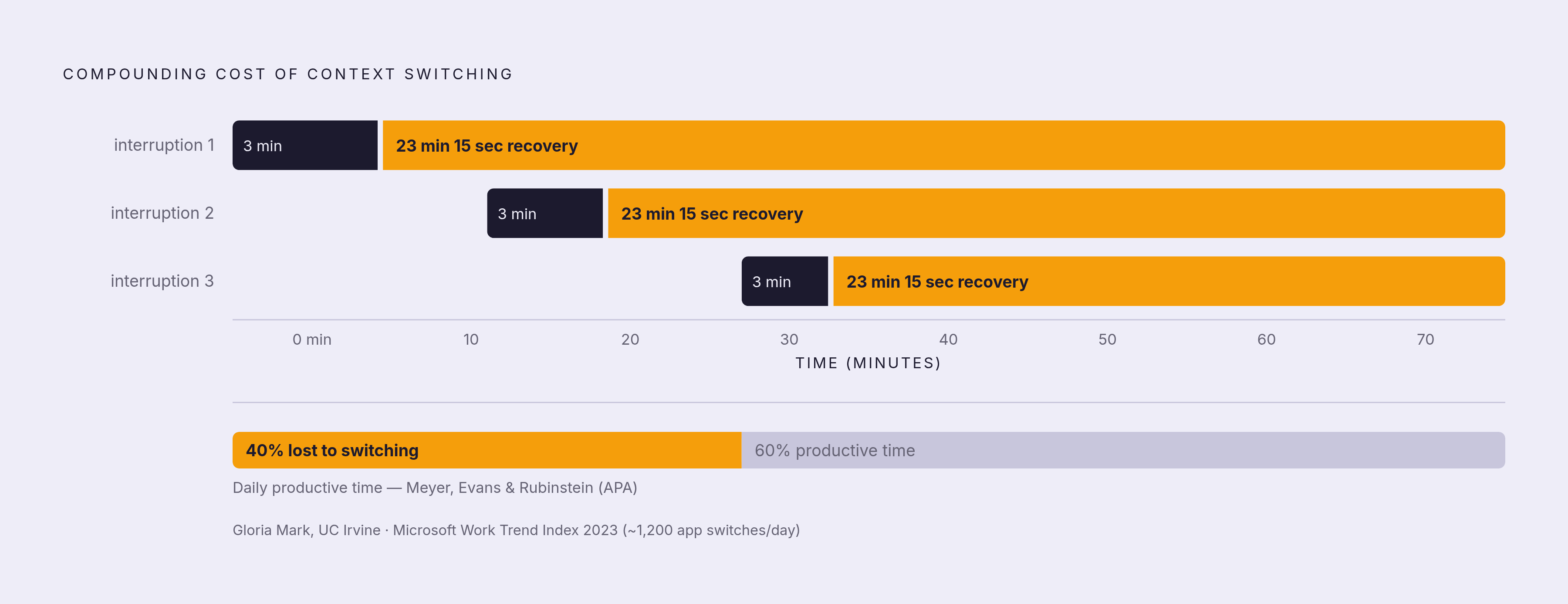
Gloria Mark's research out of UC Irvine puts a number on the tax: 23 minutes and 15 seconds. That's the average time it takes a worker to return to an original task after an interruption. Not to finish it, just to get back to where attention was before the phone buzzed or a colleague stopped by.
Here's what makes that figure land harder: in the same research, workers averaged just 3 minutes on any single task before switching to something else, juggling something like 12 different working spheres across a day. Run the math. Even a conservative count of six interruptions in a day doesn't cost six lost moments. It compounds into hours of degraded attention, because each recovery period eats into the next task before it's even started.
The scale of this is larger than most people assume. Microsoft's 2023 Work Trend Index, which surveyed 31,000 workers, found knowledge workers switch between apps and websites nearly 1,200 times a day, costing about 4 hours a week in reorientation alone. RescueTime's data lands in a similar place: the average knowledge worker switches applications 720 times across an 8-hour day, or roughly once every 40 seconds. That's not a distraction problem anymore. That's the operating condition of most desk jobs.
Why does a quick glance at an email cost so much more than the 10 seconds it took to read it? Research on attention residue offers the mechanism: part of the brain stays anchored to the previous task even after attention has moved on. The switch isn't clean. Nick Monsell's 2003 review in Trends in Cognitive Sciences found the same thing from a different angle: even when a switch is fully anticipated and prepared for, some residual cost remains. It doesn't go away with practice. It's baked into how attention works.
Put a number on the aggregate effect and it gets uncomfortable. A review by Meyer, Evans, and Rubinstein for the APA found mental blocks from switching can cost as much as 40% of someone's productive time. And separately, roughly 40% of knowledge workers never get a single stretch of more than 30 uninterrupted minutes in an entire workday. Those two 40-percents aren't the same statistic, but they describe the same trap from two directions.
There's a stress cost too, and it's not trivial. Mark's research found interrupted workers compensate by speeding up, working faster to make up lost ground, but at a measurable cost in stress, frustration, and error rate. Microsoft's 2022 hybrid work study found employees with more digital interruptions reported 26% higher stress levels. And the multitasking myth doesn't hold up under scrutiny: only about 2.5% of people can genuinely handle two demanding tasks at once without performance loss. For the remaining 97.5%, what feels like multitasking is rapid switching, with all the penalties above stacking on top of each other.
Why deliberately scheduled blocks of time work, what the research actually shows
Worth being honest about a gap here: no randomized controlled trial has tested "time blocking" by that name. Search PubMed and it doesn't appear. So what's the evidence actually resting on? The mechanisms underneath it, which have been studied for decades under different labels.
The strongest one is implementation intentions, a concept from psychologist Peter Gollwitzer. His research shows that specific plans linking a behavior to a time and place dramatically increase the odds someone follows through on it. A 2006 meta-analysis covering 94 separate studies found a medium-to-large effect on goal achievement (d = 0.65). Just naming when and where you'll do something makes you meaningfully more likely to actually do it. Time blocking is that principle, applied to an entire workweek.
The closest thing to a direct test comes from a 2023 study titled "Focused Time Saves Nine," which gave 89 office workers software that protected blocks on their calendars. Compared to a control group, they worked fewer hours after-hours, stayed more engaged during focus sessions, and reported feeling more productive. Small sample, single company, but a rare direct look at what protected calendar time does in practice.
Cal Newport has built the most complete practitioner synthesis on top of this research. His argument: the ability to do cognitively demanding work without distraction is getting rarer at the same time it's getting more valuable, which is a strange kind of opportunity for anyone willing to build the habit. Newport has described time blocking as making workers up to twice as efficient as conventional to-do-list planning, and his central claim is a striking one: a 40-hour time-blocked week can produce the same output as a 60-plus hour unstructured one. He attributes the gain to three things: eliminating the attention residue tax, using small gaps in the day that would otherwise go idle, and building a realistic sense of how long things actually take through repeated feedback.
There's a neurological logic underneath all this too. The brain seems to prefer temporal chunking, meaning a defined time boundary activates focus more effectively than an open-ended list ever does. And research from Macan and colleagues found that perceived control over one's own schedule predicts both performance and stress outcomes. Not actual control necessarily. The feeling of it.
The four methods and how to choose among them by task type
Standard time blocking is the foundation everything else builds on. The to-do list gets replaced entirely by calendar assignments: every task gets an actual slot, not just a place on a list ranked by urgency. Asana's framework breaks this into two fundamentals: visual scheduling, where the block exists on the calendar and simply cannot be scheduled over, and task grouping, where similar tasks get consolidated instead of scattered.
Task batching handles the small, recurring stuff. Group similar small tasks into one concentrated block instead of letting them interrupt the day piecemeal. The classic example: two designated 20-minute email windows instead of checking a inbox 74 times a day. This fits anything under 30 minutes: admin work, quick messages, approvals, short reviews.
Timeboxing looks similar to standard blocking but adds a hard stop and a defined deliverable. The block ends when the clock runs out, not when the task feels finished, which is exactly what limits scope creep on the kind of work that tends to expand to fill whatever time it's given. Planning sessions and iterative drafts are the natural fit here.
Day theming operates at a different scale entirely: instead of theming hours, it themes whole days. Mondays for meetings, Tuesdays for creative work, Wednesdays for administrative tasks, as one example structure. This cuts context switching not just within a day but across an entire week, and it's the right tool for anything that needs several consecutive hours of deep focus. A quarterly strategy document. A long-form deliverable. Complex development work that can't tolerate being chopped into 45-minute fragments.
The matching principle underneath all four methods is simple enough to state directly: deep, multi-hour cognitive work goes to day theming, short low-cognitive tasks go to batching or timeboxing. Most knowledge workers need some combination running across their week. Rarely does one method, applied everywhere, actually fit the shape of the work.
How to build the system: a step-by-step implementation sequence
Start by capturing everything before scheduling anything. Every task, follow-up, review, planning session, and recurring responsibility goes onto one list first. Don't start assigning blocks from a partial picture. Scheduling before the full scope of the week is visible creates a false sense of control that falls apart by Wednesday.
Next, find the cognitive peak window. Most knowledge workers get somewhere between 2 and 4 hours of real peak focus a day, and the goal isn't to extend that window through sheer effort. It's to locate it accurately. Track energy across several days before committing to a fixed slot, rather than assuming it falls at any particular time of day. Newport's guidance for anyone starting out: begin with 60 to 90 minute deep work blocks and extend them gradually as focus stamina builds. Don't start with a 4-hour block on day one.
Once the window's located, put deep work there first, before meetings, before email, before anything administrative. The block goes on the calendar as a non-negotiable commitment, not a soft preference that dissolves the moment someone asks for 15 minutes. Morning deep work scheduled ahead of the day's first meeting is the structure most consistently recommended across practitioner sources, and for good reason: meetings have a way of running long and eating into whatever comes next.
Estimate honestly, and build in buffer. Estimation accuracy might be the single factor most likely to make or break the whole system. Underestimate consistently and tasks cascade into each other, one overrun triggering the next, stress compounding along the way. Buffer blocks, designated gaps built specifically to absorb overruns and real emergencies, keep one bad estimate from collapsing the rest of the day. Newport's feedback loop matters here too: consistent time blocking, over weeks, calibrates estimates against reality instead of against optimism.
Batch the low-cognitive tasks into fixed windows. Email, messages, admin work, all of it assigned to specific blocks rather than left free to interrupt deep work whenever it wants. Batched email windows directly counter that pattern of checking an inbox dozens of times without meaning to.
Protect the blocks with actual environmental design, not just good intentions. Notifications off during deep work. A calendar block means nothing if a phone keeps buzzing through it. Tell colleagues about the system, set expectations for response times during focus periods, because roughly 40% of workers never get 30 uninterrupted minutes in a workday, which means protecting blocks requires more than just scheduling them.
Close each day with a short plan for the next one. Newport calls this a shutdown ritual: review what's unfinished, assign it to a future block, close the day cleanly. This matters more than it sounds like it should, because the brain releases incomplete tasks more easily when there's a recorded plan for them somewhere. Without that, attention residue follows people home.
The adaptation period and the adjustments most people need to make
Most practitioners report it takes 4 to 6 weeks before time blocking starts feeling natural instead of like a chore layered on top of an already full day. The early weeks will surface estimation errors, a lot of them. Treat that as calibration data. It's not evidence the system is broken.
Rigidity is the most common early mistake, and it's worth naming directly. Not every block deserves equal protection. Admin work and routine meetings are negotiable; deep work and strategic planning are not. When something unexpected comes up, and it will, the system needs to flex around the protected blocks rather than collapsing entirely. Treating a single disrupted day as proof the whole approach doesn't work is what actually causes people to abandon it, far more often than the interruption itself does.
Underestimation compounds hard in those first weeks. Tasks take longer than predicted, reliably, and that's normal. The fix is buffer blocks, not shrinking them to squeeze in more work, which is the instinct a lot of people reach for and the wrong one. Give it a few consistent weeks and estimates start grounding themselves in actual duration instead of hopeful guessing.
Then there's the social friction, which is often harder to solve than the internal discipline. Colleagues scheduling over a protected focus block is the most commonly cited obstacle to keeping the system alive. The practical fix isn't defending each block individually, which gets exhausting fast. Make focus blocks visible on shared calendars, set designated response windows, and explain the purpose of the system once rather than justifying it meeting by meeting.
The payoff compounds the longer it runs. Macan's research on perceived schedule control found it predicts both performance and stress outcomes, and that benefit deepens as the system stops requiring conscious effort and becomes just how the week works. The "Focused Time Saves Nine" study found something worth sitting with: protected-block workers spent less time working after hours. The gain isn't only more output. It's less bleed into the time that's supposed to be recovery.
Tools and AI assistance that support time blocking without displacing the thinking behind it
Any calendar app can run this system. Nothing about time blocking requires sophisticated software, and it's worth saying plainly: a paper planner and enough discipline will get someone most of the way there.
Where more capable tools add value is in reducing the friction around scheduling, not in making the decisions themselves. AI-assisted scheduling can help surface patterns, like which estimates tend to run long, or which days consistently get overloaded, and it can automate the busywork of moving blocks around when a meeting shifts. That's a real help. What it shouldn't do is decide what counts as the highest-value work in a given week, or judge when a cognitive peak window has actually arrived. That judgment stays with the person doing the work, because it depends on context no tool has access to: how a project is actually going, what's genuinely urgent versus what just feels urgent, where energy is running low today versus yesterday.
The tool's job is narrow: cut the friction of building and adjusting the schedule. The thinking behind which blocks matter, and why, has to stay with the person whose attention is actually the scarce resource being protected.