Prompt Engineering Fundamentals for Personal AI Use
Learn practical techniques for getting better results from AI without coding or technical knowledge.

Let me start with what the term usually does to people: their eyes glaze over, they mentally file it under "developer stuff," and they move on. I get it. The name doesn't help. But stay with me for a second, because the actual practice is closer to learning how to give a decent briefing than anything resembling code.
The working definition is simple. Prompt engineering means designing and refining what you say to an AI model so that what comes back is actually useful. That's it. No configuration, no syntax, no terminal window.
Here's what's worth understanding about how these models work, because it reframes almost everything else. A large language model is, at its core, a prediction engine. You give it text; it predicts what should come next, drawing on patterns from an enormous amount of training data. Your prompt isn't a command in any programming sense. It's the setup that steers the prediction. Change the setup, and you change what gets predicted.
This matters more than it appears, because it changes how you interpret a weak result. A vague output isn't the model being difficult. It's the model producing the most statistically probable response to an underspecified input, which is broad, hedged, and generic. The problem is upstream, in the input, and that means it's fixable.
What prompt engineering isn't: a magic formula, a one-time configuration, or something you absorb from documentation. Microsoft's curriculum for generative AI beginners describes it as more art than science, improved through deliberate practice and iteration. That matches what I've seen. You get better by doing it, paying attention to what changed, and adjusting. The same handful of principles apply whether you're drafting a difficult email, working through a career decision, or trying to understand something you've never encountered before. The task changes; the underlying discipline doesn't.
The components that make a prompt work
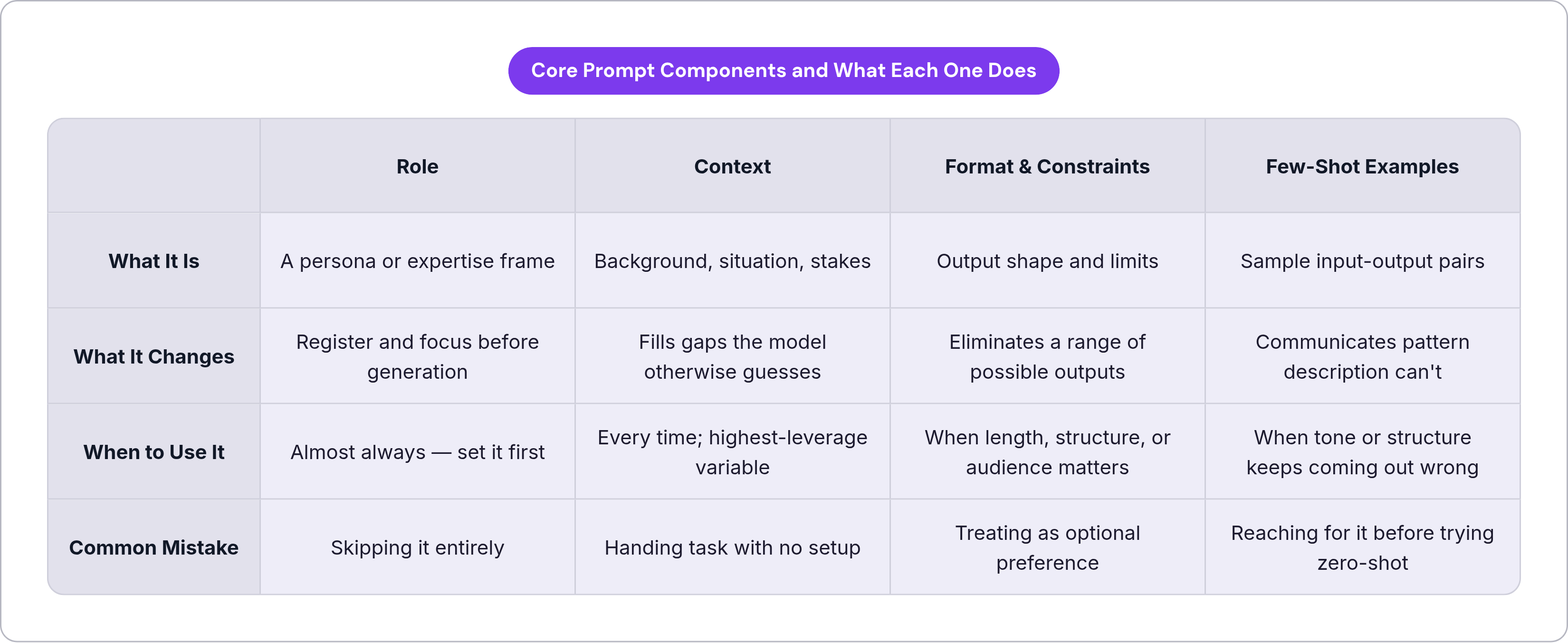
A well-structured prompt has identifiable parts. You don't need all of them every time, but knowing the parts is how you diagnose what's missing when a result comes back flat.
The core components are role, task, context, format, constraints, and sometimes a defined audience. A useful diagnostic test from Garrett Landers' 2025 prompt engineering guide: if you can roughly predict what the response will look like before you run the prompt, it's well-structured; if you have no idea what you're about to receive, something is underspecified.
Role narrows the model's focus before it generates a single word. Asking for feedback from "a skeptical editor looking for logical gaps" versus "a supportive writing coach trying to find the strengths" will produce noticeably different responses to the exact same piece of writing. The role sets expertise level and tone as a prior condition.
Context is, in my experience, the single highest-leverage variable for everyday use, and the most consistently underprovided. People hand the model a task and skip the setup entirely. The model fills the gaps with generalities, and then the person wonders why the output feels impersonal or off-target. More relevant background almost always produces better output; it's not a complicated relationship.
Format and constraints are technical inputs, not stylistic preferences. Telling the model to respond in under 150 words, use a numbered list, or explain something to a non-expert actively shapes the prediction space. These aren't suggestions the model weighs; they're parameters that eliminate a range of outputs it would otherwise produce.
One habit worth developing early: define what a good answer looks like before you ask the question. What you're doing is giving the model an output contract, reducing ambiguity more reliably than hoping it infers your intent. You don't need all the components in every prompt, but knowing which one is absent is how you fix a weak result rather than just running it again and hoping the second attempt lands better.
Zero-shot and few-shot prompting, where to start and when to level up
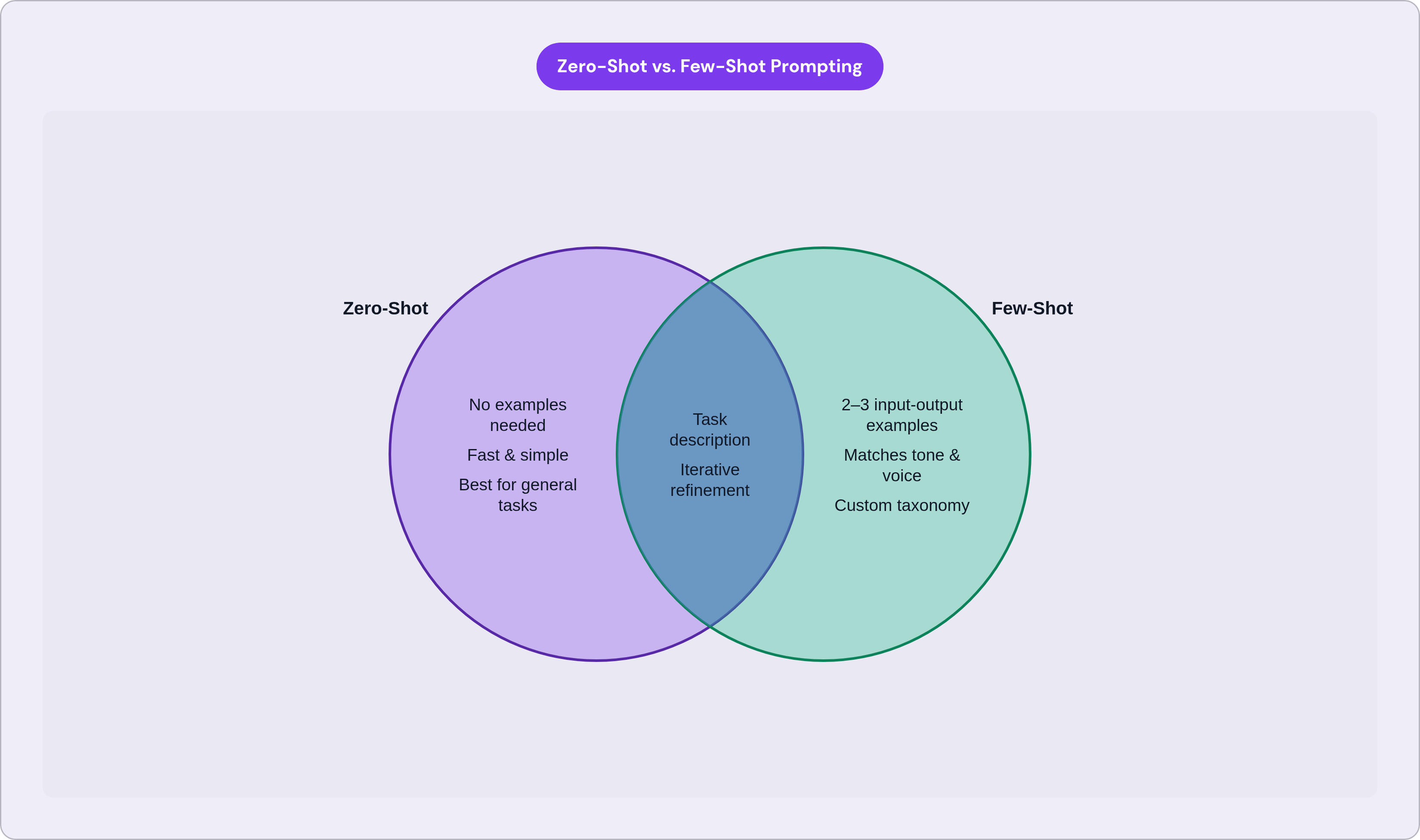
Most people are already doing zero-shot prompting without knowing it has a name. You give the model a task, no examples, no setup beyond the task itself, and let it draw on what it already knows. For general, well-understood requests, this is the correct default. It's fast, it requires no preparation, and it works.
Where it breaks down is on tasks that require a specific tone, a particular structure, or a classification pattern the model can't infer from the task description alone. You've probably felt this: you ask for something in your voice, and what comes back sounds like a press release. Or you need something categorized in a specific way, and the model invents its own taxonomy. That's the gap few-shot prompting closes.
Few-shot prompting means giving the model two or three examples of the input-output pattern you want it to follow. Research summarized by better-prompting.com suggests that two or three examples can improve output quality by 300 to 500 percent on structured tasks like summarization, classification, and rewriting. I'd treat that range with some skepticism as a precise figure, but the directional finding is consistent with experience: examples communicate what description can't.
The personal use cases where this pays off immediately are specific. If you want the model to write in your voice, give it two samples of how you actually write, not a description of how you write. If you need to categorize a recurring list, show it two or three labeled examples before asking it to continue the pattern. If you're generating content that has to match a format you already use, show it the format.
The upgrade logic is simple: start zero-shot, evaluate the output, and add examples only when the structure or tone is off. Don't reach for few-shot by default. Use it when the simpler approach reveals a specific gap it can't close on its own.
How chain-of-thought prompting handles tasks that require reasoning
Chain-of-thought prompting means asking the model to work through a problem step by step rather than producing an answer directly. The abbreviation is CoT; the underlying idea is older than AI.
Why it works is worth understanding. When a model jumps straight to a conclusion on a complex task, it can produce something that sounds fluent and confident while skipping over the intermediate logic required to actually get there right. Asking it to show its work, to surface each step before arriving at the final answer, forces those intermediate steps into the output where they can be evaluated. A model that has to trace its reasoning is less likely to arrive, confidently, at a wrong answer.
The performance data from controlled research is striking. On a standardized set of math word problems, CoT prompting more than tripled the accuracy of a large model. Across mathematical reasoning and logic tasks more broadly, one meta-analysis reported accuracy improvements from the high teens to the high seventies. The mechanism is consistent across those findings: explicit intermediate steps improve correctness on tasks where the answer depends on getting those steps right.
There's a zero-shot shortcut worth keeping in your back pocket. Simply adding "let's think step by step" to a prompt can meaningfully activate reasoning behavior without requiring examples; that finding comes from Kojima et al.'s 2022 research and has held up well. It's one of the most useful single phrases in everyday prompting, disproportionately useful relative to how simple it is.
Personal use cases where this changes the quality of what you get back: working through a financial or logistical decision that involves real tradeoffs, debugging why a plan isn't producing the results you expected, evaluating an argument critically rather than just absorbing it.
One caveat worth naming. CoT is designed for standard language models. Specialized reasoning models like OpenAI's o3 or DeepSeek R1 have reasoning processes built into their architecture; they're already working through problems before producing output. Applying chain-of-thought instructions to those models is redundant and can actually interfere with how they're designed to operate. Knowing your tool well enough to match the technique to the model is part of the skill, not a minor detail.
Role prompting and context-setting as everyday habits
Role prompting is assigning the model a specific persona before you ask your question. "Act as a skeptical editor reviewing this argument for logical gaps" produces something quite different from "act as an enthusiastic collaborator helping me develop this idea." Both are useful at different times; the point is choosing deliberately between them rather than getting a blend of neither.
What the role actually does is activate a narrower, more relevant slice of the model's training. Fewer generic answers, more calibrated ones. It sets a register before the model generates its first word.
Context is the multiplier, and the two work together in a specific way. A role without context still leaves the model guessing at what you actually need. Context without a role often produces the right information in the wrong register: too technical, too general, too formal for the situation at hand.
What rich context looks like in practice is specific rather than abstract. It includes your constraints ("I have two hours and no budget"), your audience ("I'm explaining this to someone who has never invested before"), your existing knowledge level ("I already understand the basics, so skip the introduction"), and the actual decision at stake ("I'm choosing between X and Y and need to think through the tradeoffs carefully"). Each of those details eliminates a class of outputs that would have been technically correct but practically useless to you.
The habit worth building: treat context as an input cost worth paying. Five extra seconds of setup routinely eliminates one or two rounds of correction afterward; over dozens of sessions a week, that compounds into a noticeably different experience. You stop feeling like you're wrangling the tool and start feeling like it's working with the grain of what you actually need.
Iteration as a skill, not a sign that the first prompt failed
A misconception I've seen repeatedly, and held myself early on: treating the first response as a verdict. If it's not quite right, people either abandon the session or restart from scratch. Both responses forfeit the most valuable part of working with a language model, which is the iterative loop.
The first response is a draft. You read it, you diagnose what's off, and you adjust one variable at a time. That last part matters more than it sounds. If you change three things simultaneously, you won't know which one fixed the problem, and you won't be able to replicate it next time.
A practical diagnostic: if the answer is too generic, add context or assign a role. If the structure is wrong, add format constraints or an output example. If the reasoning is shallow, add "think step by step" or ask explicitly for tradeoffs. If the tone is off, drop in a few-shot example of what you actually want.
The better metaphor for an AI session is briefing a skilled contractor, not querying a search engine. A good contractor asks clarifying questions and refines their understanding as the work develops. You should do the same thing in reverse: refine the brief as you see how the model interprets it.
The mistakes that quietly undermine results
Vagueness is the most common and highest-impact mistake. MIT Professional Education research attributes a significant share of generic AI output to a simple lack of specificity in the input. A vague prompt doesn't produce a wrong answer so much as a broad, safe, averaged one, which is often just as useless for practical purposes.
Overloading is the second mistake, and a subtler one. Asking a single prompt to analyze a problem, project a budget, and recommend a course of action, all at once, risks incoherent output where each piece is underdeveloped. Complex requests almost always perform better when broken into focused sub-prompts with clear, individual scopes.
One-shot thinking is quieter but consistently damaging. Treating prompt engineering as a single-attempt process, hoping the first output is good enough rather than planning to refine, is probably the most common reason people plateau. The users who get the most from AI iterate; they plan to refine from the start.
Over-reliance without verification is a real risk, and a practical one. Language models produce confident, fluent text, which makes errors easy to miss on a quick read. Forty-four percent of users regularly correct AI mistakes, a figure that should be read not as a failure of the tool but as a reminder that output review is non-optional. Drafts are drafts, regardless of how polished they look.
Sensitive data exposure deserves a plain mention. AI tools have full access to the content of your prompts. Passwords, personal financial details, and identifying information belong nowhere near a prompt field. Some platforms have had documented incidents involving data handling during sessions. Treat the prompt field the way you'd treat any cloud-connected form.
Finally, applying chain-of-thought prompting to specialized reasoning models like OpenAI's o3 or DeepSeek R1, models that already have reasoning built into their architecture, wastes effort and can degrade output. All of these mistakes share the same root error: treating the AI as self-sufficient rather than as a collaborator that needs well-structured inputs to produce well-structured outputs.
What deliberate prompting practice actually produces over time
Harvard Business School research tracking 758 professionals using GPT-4 found that AI improved work quality by 40% and sped up task completion by 25%. Those gains were tied specifically to appropriate use on well-matched tasks, not blanket usage across everything. The lift is real, and it's conditional on how you work the tool.
Workers using AI regularly report saving meaningful blocks of time per day; heavy users report savings that accumulate into hours per week. Seventy-five percent of enterprise workers report improved speed or quality. The gap between that group and the 44% who spend significant time correcting outputs is, in large part, a prompting gap, not a gap in what the models can do.
The compounding effect is where the practice gets interesting. A small library of well-crafted prompts for recurring tasks, weekly planning, email drafting, research synthesis, decision framing, turns a daily habit into a durable asset. You stop rebuilding from zero each session. You start with a structure that already works, refine it as your needs shift, and the work gets easier over time rather than staying effortful.
In practice, this doesn't require a complex system. A few role-plus-context templates for the task types you return to most often. A default reasoning cue you attach to decisions. A built-in review step that treats every output as a draft until you've read it critically. That's the whole thing.
The core principle underneath all of it is this. Prompt engineering at the personal level is about structuring your input well enough that the AI's pattern-matching works with your judgment rather than around it; it's not about outsourcing your thinking. You still make the calls. The tool gets better at supporting them, the more deliberately you've set it up to do so.