Migrating From Confluence to a Modern Knowledge Base
Successful migration requires fixing macros, attachments, and permissions before the move.

Migrating from Confluence to a modern knowledge base is a chance to fix how knowledge is organized, owned, and used. The teams that succeed treat the move as a structural change. Their goal is not a clean import report, but a system where people can find a current answer and use it to finish real work.
Why teams are leaving Confluence now, not later
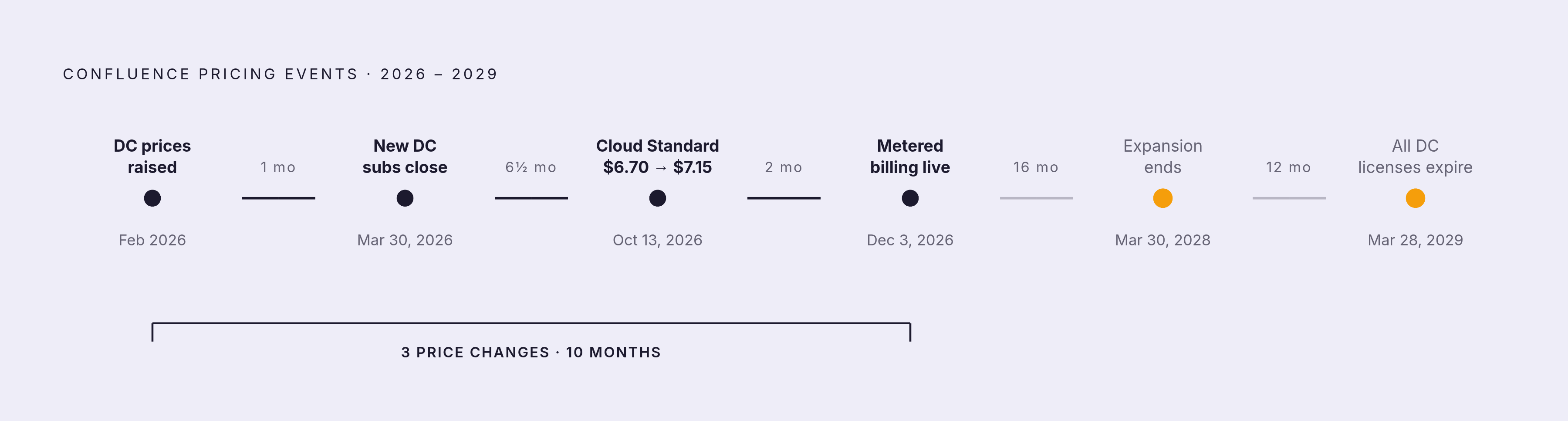
A renewal or retirement deadline is a poor place to begin planning. Under pressure, teams tend to choose the quickest way to move instead of working through what should go into their next system. In 2026, that pressure has concrete dates attached. All Confluence Data Center licenses expire March 28, 2029, new customer subscriptions closed March 30, 2026, and license expansion ends March 30, 2028. The window for making a deliberate choice is narrowing before the final deadline arrives.
Atlassian’s pricing changes also weaken the argument that staying offers predictable costs. Atlassian raised Data Center list prices in February 2026 and raised Confluence Cloud prices again on October 13, 2026, when the price of Standard for smaller teams went from $6.70 to $7.15 per user per month. Beginning December 3, 2026, Atlassian is introducing metered billing for Rovo credits, Automation steps, and AI agent resolutions as separate budget lines, bringing the total to three price changes in under 14 months. They change the comparison between the cost of moving and the cost of staying.
Product fit adds another pressure. Confluence’s Jira-native posture can leave finance, people ops, and customer teams working in Google Docs or other tools while the wiki becomes an engineering archive. In that situation, the problem is not simply the price of the wiki, but whether it serves the whole company. An AI layer over Confluence could improve retrieval without the disruption of switching platforms, provided the underlying knowledge is worth retrieving.
What actually breaks during a Confluence migration (and why most teams don't see it until after)
A successful transfer does not prove that the content still works. Three categories can fail silently, namely macros, attachments, and permissions. A migration report may count the page as moved without showing that a procedure has lost its working parts. That gap between transfer and usability explains why problems often emerge only after people return to their jobs.
Macros are the main failure point because their behavior is not portable. Confluence executes macros on the server and inserts their rendered output into the page. Exported HTML therefore captures a snapshot, and that snapshot cannot be mechanically reversed into an equivalent in another platform. Jira issue lists, expandable sections, page properties, and third-party diagrams have no direct equivalent in platforms such as Notion, SharePoint, or Slab. A runbook can consequently arrive with a grey box reading “Unknown macro” where a formatted table belonged, even though the report says it moved.
Attachments present a less visible discovery problem. Confluence stops extracting text and indexing file contents for attachments larger than 100 MB, leaving only the filename searchable. Scripts that search the contents of files can therefore miss large PDF, Excel, or ZIP attachments. Even when those files reach the destination, they can remain opaque blobs rather than useful, searchable assets.
Permissions need a different kind of fix because teams must redesign the access logic. Confluence combines global permissions, space permissions, and content restrictions, while Notion uses workspace members, guests, groups, and page sharing settings. Those structures do not map cleanly. A mechanical transfer can leave content over-exposed or silently inaccessible. An administrator who checks the imported pages may miss either failure.
What to audit before you move a single page
Begin with content inventory and triage, the ROT analysis. Separate high-frequency operating content, including runbooks, SOPs, onboarding checklists, and policies, from reference material, dead pages, meeting notes, and outdated project debris. Pull recent page views and search queries over a meaningful lookback window. Flag the most-viewed articles and the top queries that returned no results to establish what must work on day one. Give each critical workflow one canonical page, and settle any cases where two pages give different answers to the same question.
Next, build a macro mapping reference that records every macro type in use. For each type, decide whether to keep a static HTML snapshot, re-author it as a native equivalent, or assign a manual rebuild. Scope that remediation and give it an owner before setting the timeline. Make a separate list of attachments over 100 MB. Map the destination of every screenshot, template, spreadsheet, and downloadable asset that a procedure needs.
Document global permissions, space permissions, and content restrictions before export. Assign an owner to each content domain, including HR, engineering, support, and finance, to verify content and access after the move. Name the backups, subject matter experts, legal and compliance owners, and platform admins before transformation starts. An unowned domain is a source of future stale content.
Finally, put the minimum metadata for each page in a CSV or database before using export tools. Capture source system, source ID, title, URL/slug, body excerpt, full body, attachment count, labels and tags, owner, created date, updated date, view count, and any linked tickets. Together, these records establish the scope of the move. They also help teams choose a platform, since it must handle the content, access needs, and workflows found in the audit.
How the main destination platforms handle what Confluence cannot
Notion suits teams seeking a flexible, document-first workspace with database views. Its nested pages, databases, filtered views, and page-level permissions differ from Confluence’s space-and-page-tree model, so the information architecture needs redesign. Notion’s documented file migration path is to export a Confluence space as HTML and import the ZIP, with support for Confluence Cloud and server instances. The ZIP-file importer is limited to 5 GB, or 15 GB upon request, while the API importer supports up to 30 GB. Large spaces with lots of attachments need to move in batches, and spaces with complex permission hierarchies or heavy macro use take more work.
Coda is a fit when a few people write content that many others read. That makes the balance between authors and readers a useful audit finding when considering it. Slab, by contrast, targets documentation-first teams and offers a native Confluence-to-Slab import tool. Core text and basic structure transfer cleanly, but proprietary Atlassian elements do not. Macros, permissions, and comments need manual work or custom extraction scripts, so the native importer reduces setup work without removing remediation.
Document360 and GitBook are built for documentation that people outside the company can read, beyond an internal company wiki. They belong in the comparison when Confluence mainly holds API docs, user manuals, or customer self-service content. Document360 is purpose-built for this use case, keeping technical documentation clean, version-controlled, and navigable without relying on third-party macros. SharePoint presents a different design choice. Where Confluence uses freeform labels, SharePoint uses managed metadata term sets, content types, and enterprise keywords, which makes taxonomy design a prerequisite.
AI-native platforms address retrieval by connecting to multiple source systems, including Confluence, and surfacing contextual answers. Their premise is that the knowledge base can support reasoning across sources. This can bring people the information they need where they need it, without moving every source. However, that capability does not decide which information is correct. The audit must distinguish a need for better retrieval from a need to repair the knowledge being retrieved.
Running the migration without breaking what people actually use
Before transformation starts, write a document that maps each field. For each field, record the source field name, transform rule, target field name, and verification rule. This is the contract the engineering or automation team implements. Use tool pre-checks to establish what will and will not migrate, and mark app-specific data and complex macros as explicit remediation work.
Then run a three-stage pipeline of Export → Transform → Import. Keep it scriptable, observable, and safe to run again after a failure. A Confluence space export can use XML/ZIP if that format works with the chosen path. For a move to Confluence Cloud, the Confluence Cloud Migration Assistant offers pre-migration checks, but it is a migration tool rather than a general export tool and has a 200 MB XML size limit per space. It should not be mistaken for an export route to another knowledge base.
During transformation, carry out the macro decisions from the audit. Turn content that works as static HTML into that format, re-author native equivalents, and send the rest for manual rebuild. This stage cannot be fully automated. Import large spaces in batches and validate each batch before proceeding. Set a content freeze for high-risk areas, and communicate the window to content owners before it begins so source and destination do not immediately drift.
Before cutover, rebuild permissions from the audit’s mapping document and have each function owner verify access in their domain. Test with real users, real tasks, and real permissions. A support lead should be able to resolve a case using the current runbook. A new hire should be able to find the right form, owner, and escalation path from the onboarding checklist, and a sales manager should find the latest pricing exception policy without asking RevOps. Import completion is not evidence that these workflows are ready.
Finally, account for links outside the new platform. Internal links, bookmarks, old training documents, and copied URLs in Slack, email templates, and onboarding checklists all need a cutover plan. Set up redirects or place a link-deprecation notice on legacy pages pointing to the new location. Otherwise, familiar routes lead nowhere useful, undermining trust even when the destination content is sound. That is how a new knowledge base ends up competing with a shadow system of chat answers, shared drives, and legacy bookmarks.
Why governance is the migration — and why AI makes it impossible to skip
The lasting failure is often not content lost in transit, but a well-organized destination that decays within months. Governance prevents that decay only when it is part of the design before launch. This is also where the argument for simply adding AI gets its answer. When content is well-maintained and retrieval is the problem, an AI layer over Confluence is a legitimate option. When content is stale, the same layer can turn it into confident, cited wrong answers.
Teams dealing with stale documentation report wasted time and rework, wrong information reaching customers, and compliance exposure. Gartner’s survey of customer service and support leaders found that a majority reported a backlog of knowledge articles waiting to be edited, and more than a third had no formal process for revising stale ones. AI cannot supply that missing process. Regulations including the EU AI Act also give governance legal weight through enforceable AI-interaction disclosure and labelling of AI-generated content.
In practice, every active page needs a named owner and a review date as conditions for remaining in the knowledge base. Templates can embed ownership blocks, review dates, and escalation sections so responsibility is part of the content structure. A post-migration cleanup cadence should archive outdated material rather than delete it, keeping search results clean without losing history. Teams should look for audit logs and version history when choosing a platform, especially when they have compliance rules to meet. These are the controls that keep a useful answer useful after the migration team has finished.
The success measure therefore has to be behavioral. Teams should be able to get real work done faster, with fewer mistakes, without asking where to find the latest process. New hires completing standard tasks without rescue messages says more than a count of pages moved or users trained. The real destination is maintained knowledge that people can use, whether reaching it requires a new platform or a better-governed existing one.