What Gemini's Personal Intelligence Features Do With Your Data
Google's AI assistant can access years of your email, photos, and search history.
What Gemini Personal Intelligence Is and What It Connects
There is a version of this feature that sounds almost magical. You ask Gemini what restaurant you visited on your anniversary two years ago, and it knows, because the confirmation email is sitting in your Gmail. You ask whether your flight home connects through the same airport as last time, and it checks. You ask it to help you plan a trip similar to one you enjoyed before, and it actually understands what "similar" means, because it has been paying attention.
That is the core value proposition, and it deserves serious engagement before reflexive dismissal on privacy grounds. But serious engagement means understanding precisely what you are agreeing to when you turn it on.
Personal Intelligence launched in January 2026 for paid US subscribers, expanded to free US users in March, and rolled out globally in April, excluding the European Economic Area, the UK, Switzerland, South Korea, Nigeria, and Japan. More on that exclusion list shortly, because the geography is telling in ways the product announcement did not advertise.
The core idea is straightforward: Gemini 3 reasons across multiple Google services simultaneously, rather than treating each one as an isolated silo. Before this, you could ask Gemini a question and paste in an email for context. Now, with Personal Intelligence enabled, Gemini retrieves that email itself. That distinction, between manually supplying context and having the assistant go get it, is where the privacy conversation actually starts, and most coverage glosses past it entirely.
Two things are happening underneath. The first is cross-service reasoning: Gemini connecting dots across email, photos, search history, and watch history to surface proactive insights. The second is specific detail retrieval: locating a particular booking, purchase, or photo without you having to find it first. Both capabilities run on Gemini 3's long-context architecture, which holds large volumes of data from multiple sources within a single session. The feature is opt-in and works only with personal Google Accounts.
Which Data Sources Gemini Can Actually Read Once Enabled
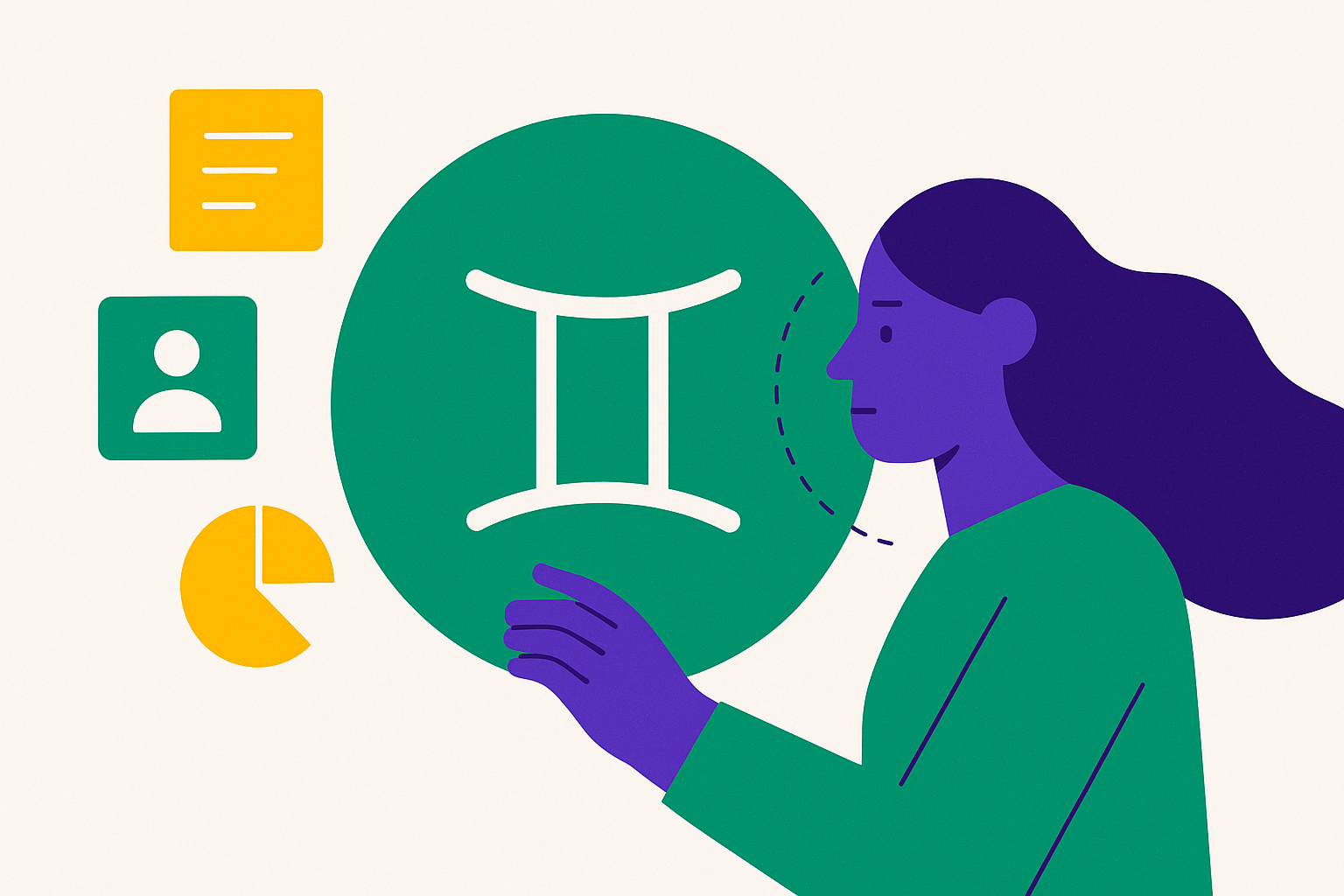
The primary connected sources are Gmail, Google Photos, YouTube, Google Search, Calendar, Drive, and Maps. Each one brings its own depth of exposure, and the depth is the part worth sitting with.
Gmail contributes travel bookings, event invitations, purchase receipts, and years of general correspondence. Google Photos adds face recognition data, relationship labels you have applied to face groups, and EXIF metadata embedded in images, which includes precise location coordinates for every photo taken with location services on. YouTube contributes watch history, content categories, and viewing frequency patterns. Search adds every query you have submitted, every topic you have researched, over time.
On mobile, the scope expands further: call and message logs, contacts, installed apps, language preferences, and screen content when Gemini's overlay is active. Location data is collected whenever Gemini Apps are in use.
Users can selectively connect individual apps rather than granting all-or-nothing access, Photos but not Gmail, for instance, and that granularity matters. But the depth dimension is what most people miss: this is not just recent activity. The access encompasses a user's accumulated history across services, in some cases years of it. A chatbot you hand one email is a fundamentally different arrangement than a system reading everything you have ever searched, sent, or photographed. The category shift is real, and the product framing undersells it.
The Difference Between Retrieving Your Data and Training on It
Google draws a clear architectural distinction here, and understanding it accurately, without either dismissing it or accepting it wholesale, matters. The distinction is real. It is also less clean in practice than it appears on paper.
Photos and emails are referenced to generate a response; they are not ingested as training material. The model is not trained to remember your specific data. It is trained to understand that when you ask for something, it can go locate it. Data is accessed per query, processed server-side, and returned as a response. The raw content does not feed into future model weights.
Where the line gets murkier is in your conversation history. On consumer Gemini plans, conversation data can be used for model training unless a user explicitly opts out. Google states it uses anonymized personal information to train AI models for internal use and filters and obfuscates personal data from conversations before any training use. That is a meaningful procedural safeguard, but it operates on the conversation layer, not on the underlying app data layer. The distinction is subtle, easy to miss, and not prominently explained anywhere in the product interface.
All processing happens on Google's servers, under the same encryption standards and access controls as the rest of Google's infrastructure. A legitimate criticism: because reasoning happens server-side, users have no independent way to verify exactly what was accessed during a given query, or how long the inference context persists after the session ends. That opacity is structural to cloud-based AI inference generally, not unique to Google. But it does mean the trust relationship here is foundational rather than auditable, which is a different kind of exposure than most people are used to thinking about.
How the Personal Context Memory System Builds a Profile of You Over Time
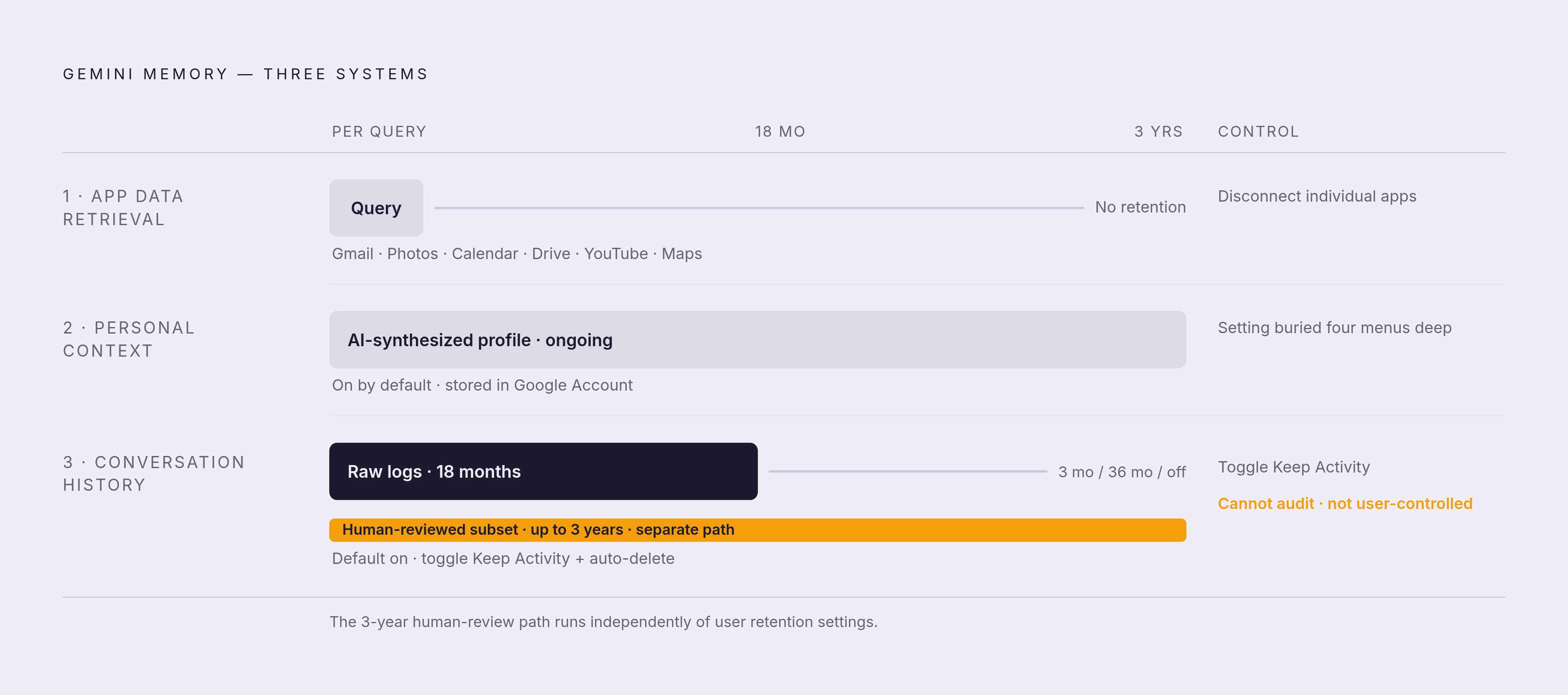
Personal Context is a separate system from app data retrieval, and this distinction matters more than most users realize, because the two systems produce categorically different kinds of data objects.
App retrieval answers a specific question: what did I book last March? Personal Context answers a slower, more synthetic question: what kind of person am I, based on everything I have told Gemini? The mechanism works by periodically generating a compressed user profile from past Gemini conversations through AI-driven summarization. Stated preferences, recurring patterns, facts you have shared across sessions: all of these accumulate and attach to your personal Google Account rather than being discarded between conversations. It is on by default for eligible accounts.
One thing that confuses attentive users: Gemini's memory is actually split across three separate systems with overlapping names, each governed by its own controls. The auto-delete setting sits behind four settings menus. If you have not gone looking for these specifically, there is a reasonable chance you have not found them.
An email is a document. A profile is a synthesis. It reflects patterns, inferences, and interpretations drawn from what you have said and how you have said it across months or years of interaction. That is a qualitatively different category of exposure, and the product design does not make that distinction obvious.
How Long Conversations Are Kept and Who Can Read Them
The default retention period is 18 months from the date of a conversation. A percentage of saved chats are sampled by trained human reviewers to evaluate response quality, accuracy, and potential harm. Google surfaces a direct warning about this in the interface: "Humans review some saved chats to improve Google AI. To stop this for future chats, turn off Gemini Apps activity."
Here is where the policy becomes specifically notable. Any conversation a human reviewer touches is kept for up to three years on a separate retention path, considerably longer than the standard 18-month window. Users cannot enumerate, audit, or delete which specific conversations have been flagged for that path. Human review is standard practice across the AI industry; the three-year extended retention for reviewed conversations sits on the longer end of what major providers publicly document.
There is also a baseline 72-hour retention window that applies to every conversation regardless of your settings, covering response delivery and feedback processing. No opt-out exists for this window. And if you delete an email from Gmail or a photo from Google Photos, Gemini's experience will not reflect that deletion immediately. Sync lag exists, and it can persist for days. That gap surprises people who assume deletion is instantaneous and comprehensive.
The Controls Users Actually Have and What Each One Does
Personal Intelligence is off by default. You turn it on. Once enabled, you choose which individual apps to connect, and you can disconnect any of them without disabling the feature entirely. You can turn the whole thing off at any time.
On the activity and retention side: toggling Keep Activity off stops conversations from being saved going forward. The auto-delete setting offers four options, three months, 18 months (the default), 36 months, or off. Temporary Chat causes the conversation to disappear after 72 hours and, by Google's terms, is not used for AI training. For sensitive queries, Temporary Chat is the appropriate mode, and most users I have spoken with about this feature have never used it. Gemini also surfaces which sources it drew from in a given response, so you can see what was actually referenced.
One thing that gets insufficient attention in most coverage: certain settings can revert after app updates, new sign-ins, or infrastructure changes on Google's side. Checking your settings periodically is not paranoia; it is maintenance, the same kind you would apply to any system where the defaults matter.
The tradeoff runs in both directions. Turning off activity storage meaningfully limits the assistant's usefulness for long-running conversations, ongoing planning threads, and multi-session projects. For quick, one-off queries, the limitation barely registers. That asymmetry should inform how you configure things, not as a binary choice but as a calibration specific to how you actually use the product.
Where Gemini Spark Changes the Calculus by Moving from Surfacing Data to Acting on It
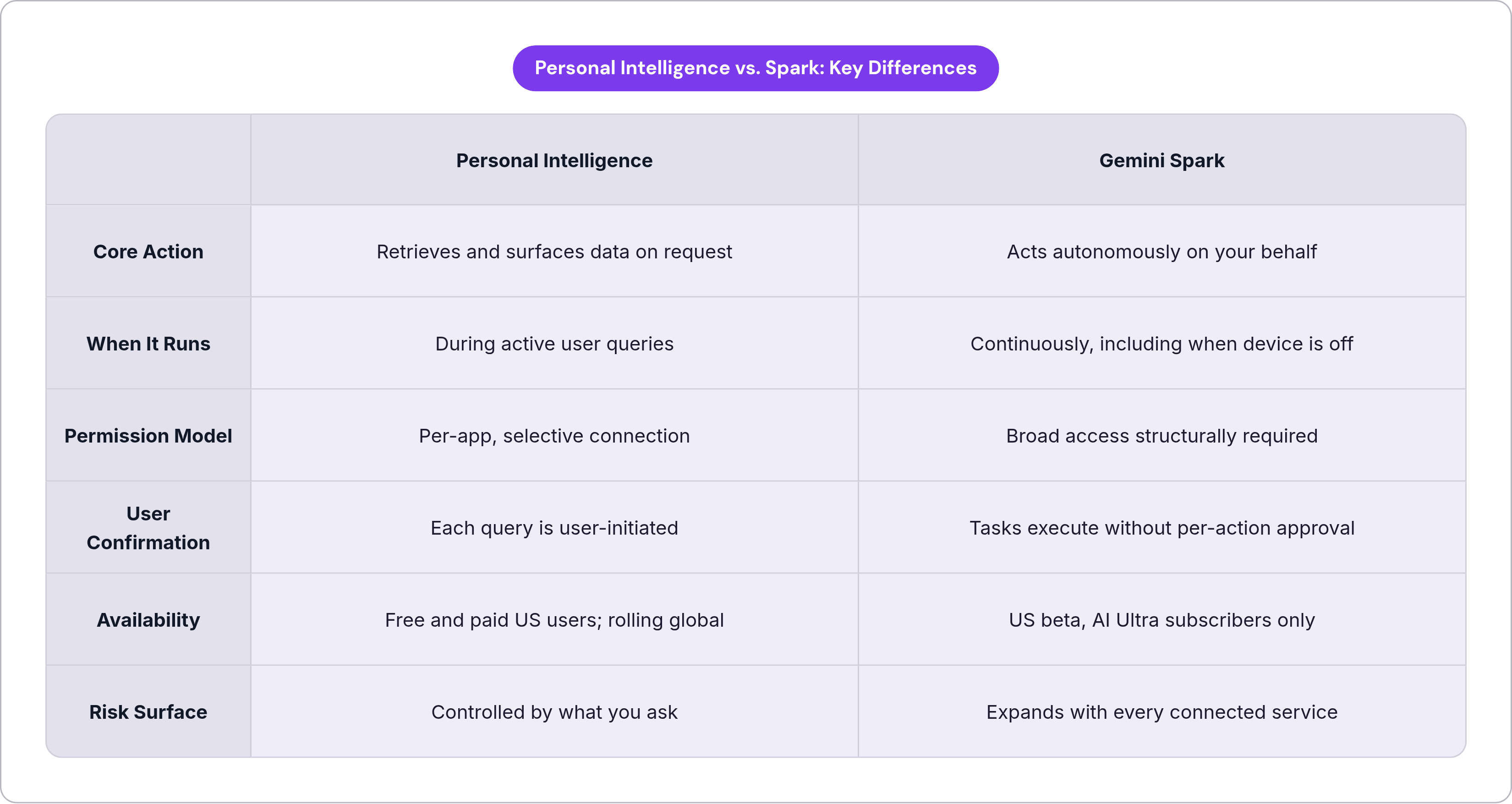
Personal Intelligence retrieves and surfaces data. Spark does something categorically different: it acts on your data, autonomously, while your device is off.
Announced at Google I/O 2026 and currently in a US-only beta limited to Google AI Ultra subscribers at $100 per month, Spark is a 24/7 agentic assistant running continuously on cloud virtual machines. When executing tasks, it draws from your tasks, schedules, skills, a remote browser and remote computer, Connected Apps, Personal Intelligence, and websites it interacts with on your behalf, including sites where you are already logged in.
Google's isolation architecture for Spark is substantive: each task runs in a fresh, ephemeral, strictly isolated VM; traffic routes through a secure Agent Gateway with Data Loss Prevention policies; user credentials are encrypted and not exposed directly to the agent. These are real technical protections.
But the threat model has shifted considerably. With Personal Intelligence, you ask a question and see which data was surfaced. With Spark, broad permissions are structurally necessary for the feature to function. Booking travel requires simultaneous access to your calendar, email, and payment data, and that access is exercised without per-action confirmation from you. Third-party tool connections via MCP are planned, which will extend the permission surface further.
A concrete example: connecting Spark to grocery or delivery services reveals food preferences, dietary patterns, and purchasing behavior to the agent pipeline. Inbox access exposes whatever sensitive messages happen to be there to the vulnerabilities of that entire pipeline. Opting into Spark is a meaningfully different decision than opting into standard Personal Intelligence. Not a more advanced version of the same decision: a different decision entirely, with a different risk surface.
How Enterprise Workspace Users Are Governed Differently from Consumer Accounts
If you use Gemini through a work or school account, the consumer data policies described throughout this piece do not apply to you. Workspace accounts are categorically excluded from Personal Intelligence, and the governance architecture is different by design.
For enterprise Workspace accounts: prompt content is not used to train Google's public AI models without explicit organizational consent, human review of conversations does not occur without the organization's agreement, and administrators can shorten or fully disable prompt storage across their entire domain. Workspace Intelligence also follows existing permission architecture, meaning if a user lacks access to a file, the AI cannot access or reference it either. Gemini for Workspace was included under Google's HIPAA Business Associate Addendum as of late 2025, making it viable for healthcare organizations operating under compliance requirements.
Consumer Gemini is explicitly not architected for HIPAA, PCI-DSS, or other regulated data frameworks. Using it for clinical notes, financial records, or legal material carries real compliance risk. The Gemini API Terms advise against uploading sensitive personal information unless legally necessary and appropriately secured. If your use case involves regulated data, the consumer product is the wrong tool regardless of how the privacy settings are configured. That sentence is worth reading twice.
The Geographic Rollout Gaps and What They Reveal About Regulatory Risk
Personal Intelligence is unavailable in the European Economic Area, the UK, Switzerland, South Korea, Nigeria, and Japan as of the April 2026 worldwide rollout.
The EEA and UK exclusions tie directly to GDPR and UK data protection law, specifically requirements around consent, data minimization, and cross-service data correlation. GDPR's constraints on correlating personal data across services are substantively more restrictive than the current US regulatory environment, and Personal Intelligence's core functionality, connecting dots across email, photos, search, and watch history, sits squarely in that constrained territory.
The rollout sequence reveals something worth naming plainly: Google launched first in markets where the regulatory framework is least prescriptive. Standard product sequencing under regulatory uncertainty, not a conspiracy. But it does mean the question "is this feature legally uncontested?" has a clear answer: not everywhere. And the jurisdictions where it remains unavailable are not peripheral markets. They include some of the world's most sophisticated regulatory environments, where these tradeoffs have been examined closely and answered differently.
EEA users who want comparable AI assistant functionality have fewer capable options precisely because the most powerful features depend on cross-service data correlation that GDPR constrains. That constraint is a deliberate design choice made by regulators on behalf of users. It reflects a different answer to the fundamental question this feature raises about who controls the data relationship, and it is worth taking that disagreement seriously rather than treating the US rollout as the obvious default.
What to Weigh Before Enabling Personal Intelligence on Your Account
The exchange at the center of this feature is not complicated to state: a more capable, context-aware assistant, in return for allowing Google's AI infrastructure to read years of accumulated email, photos, search history, and conversation data, and to build a synthetic profile of you from your interactions over time.
Some questions remain unanswered in Google's public documentation: exactly where in Google's infrastructure the reasoning occurs, how long inference context persists after a session ends, and who has access to the inference infrastructure beyond the documented human review process. These are not gotcha questions. They are things a thoughtful user should want answered and currently cannot verify independently. That gap matters, even if you trust Google's intentions.
There is also a practical lock-in dynamic that rarely gets mentioned. The more personalization context you accumulate, the more switching costs grow, not because you are technically locked out, but because that context lives on Google's servers with no portable export equivalent. What you build up over months or years does not travel with you.
The opt-in framing also deserves scrutiny on a longer timeline. What launches as an explicit, premium opt-in beta becomes default infrastructure as adoption grows and the product matures. The architectural shift Personal Intelligence represents, unified cross-service reasoning at scale, is likely to expand whether or not any individual user chooses it today.
Before you decide: for quick, one-off queries, disabling activity storage has minimal impact on what the feature can do. For long-running planning, ongoing advice threads, or multi-session projects, disabling memory meaningfully reduces the assistant's value. For anything involving health, financial, or legal data, consumer Gemini is not the right tool. A Workspace enterprise agreement or a purpose-built compliant product is the appropriate path.
If you do enable it: connect only the apps you have a specific use case for, set auto-delete to three months rather than the 18-month default, use Temporary Chat for sensitive queries, and recheck your settings after major app updates or sign-in changes.
The geography of who gets to use this feature at all, and who has been protected from it by regulation, is probably the most honest signal we have about where reasonable people land on the underlying question. The regulators who excluded their citizens from this rollout did not do so because they misunderstood the technology. They did so because they understood it well enough to reach a different conclusion about the tradeoff. That disagreement is worth carrying into your own decision.